


【AIOPS】AI Agent 专题【左扬精讲】(MCP+A2A+LangChain/LangGraph)—— 纯 Go 实现 AIOPS AI Agent:Function Calling
【AIOPS】AI Agent 专题【左扬精讲】(MCP+A2A+LangChain/LangGraph)—— 纯 Go 实现 AIOPS AI Agent:Function Calling
引言
本次精讲的 AIOPS AI Agent 专题中,MCP、A2A(Agent-to-Agent)与 LangChain/LangGraph 共同构成了复杂 Agent 系统的核心架构,而 Function Calling 则是 Agent 连接外部工具的关键能力。网上大多都是依赖 Python 生态,但对于追求高性能、低延迟的分布式系统场景,Go 语言的并发优势和编译型特性更具吸引力。
本文将聚焦纯 Go 实现 Function Calling,从开发环境搭建到完整 Demo 实战,详解如何在 Go 生态中落地 Agent 的工具调用能力,同时适配 MCP+A2A 架构的扩展需求。
一、Function Calling 基础认知 —— 从“是什么”到“为什么需要”
- 核心本质:LLM 自然语言需求 → 结构化函数调用指令 → 工具结果解析 → 自然语言回答
- 与 Agent 闭环的关系:支撑 “思考 - 行动 - 反馈” 的关键环节(意图转指令、结果转回答)
- 通俗理解:让 LLM 从 “会聊天” 到 “会干活” 的能力升级
-
- 意图转指令:Agent 将用户输入 + 工具元信息传给 LLM,LLM 输出结构化的函数调用指令(如 “调用哪个工具、传什么参数”);
- 结果转回答:Agent 执行工具后,将结果回传给 LLM,LLM 生成自然语言总结。
简单说:Function Calling 让 LLM 从“只会聊天”变成“会干活”—— 通过调用外部工具(API、数据库、脚本等)扩展能力边界,解决纯文本无法处理的问题(如数据分析、信息查询、系统操作)。
二、Function Calling 的核心价值(为什么 Agent 离不开它?3大原因)
- 意图结构化:模糊自然语言 → 机器可执行的标准化指令
- 能力外延化:突破 LLM 边界,对接实时数据 / 系统操作 / 第三方服务
- 闭环自动化:端到端无需人工介入,实现 “需求 - 执行 - 反馈 - 回答” 全流程
-
- 意图结构化:将模糊的自然语言(如 “查一下昨天服务器的 5xx 错误数”)转化为机器可执行的结构化指令(如 { "function": "query_error_count", "params": { "date": "2024-10-01", "error_code": "5xx" } });
- 能力外延化:LLM 本身无法访问实时数据、操作系统、调用第三方服务,通过 Function Calling 可对接任意工具(如 Elasticsearch 查询、K8s 接口、HTTP API);
- 闭环自动化:支持 “用户需求 → 工具调用 → 结果反馈 → 最终回答” 的端到端自动化,无需人工介入解析或执行。
三、Function Calling 的技术原理(Agent 中的工作流程讲解)
3.1、定义工具元信息(Agent 与 LLM 的 “沟通协议”)
Agent 必须先向 LLM 说明“可用工具清单”,即工具元信息(Tool Metadata),通常包含:
-
-
- 工具名称(name):唯一标识(如 elasticsearch_query);
- 工具描述(description):告诉 LLM 该工具的用途(如 “查询 Elasticsearch 中的日志数据”);
- 参数列表(parameters):工具所需的输入参数,含参数名、类型、是否必填、描述(如 index:索引名,字符串,必填;query:查询语句,JSON,必填)。
-
type Tool struct {
    Name        string      `json:"name"`        // 工具名称
    Description string      `json:"description"` // 工具描述
    Parameters  []ToolParam `json:"parameters"`  // 参数列表
}

type ToolParam struct {
    Name        string      `json:"name"`        // 参数名
    Type        string      `json:"type"`        // 参数类型(string/int/bool/json)
    Required    bool        `json:"required"`    // 是否必填
    Description string      `json:"description"` // 参数描述
}

// 示例:Elasticsearch 查询工具
var ElasticsearchQueryTool = Tool{
    Name:        "elasticsearch_query",
    Description: "用于查询 Elasticsearch 中的日志或数据,支持 Lucene 语法或 DSL 查询",
    Parameters: []ToolParam{
        {
            Name:        "index",
            Type:        "string",
            Required:    true,
            Description: "Elasticsearch 索引名(支持通配符,如 log-2024-10-*)",
        },
        {
            Name:        "dsl",
            Type:        "json",
            Required:    true,
            Description: "Elasticsearch 查询 DSL(JSON 字符串格式)",
        },
        {
            Name:        "size",
            Type:        "int",
            Required:    false,
            Description: "返回结果数量,默认 10",
        },
    },
}
3.2、构造 Prompt 并调用 LLM
Agent 将“用户输入 + 工具元信息 + 系统指令”组合成 Prompt,发送给支持 Function Calling 的 LLM(如 GPT-3.5/4、Claude 3、通义千问、智谱清言等)。
func buildPrompt(userInput string, tools []Tool) string {
    systemPrompt := `你是一个 AIOps 助手,负责通过工具查询和分析服务器日志。
可用工具:%s
如果用户的需求需要查询日志,请调用对应的工具,输出格式为 JSON:{"function": "工具名称", "params": {"参数名": "参数值"}}
如果不需要调用工具,直接返回自然语言回答。`

    // 将工具元信息转为 JSON 字符串
    toolsJSON, _ := json.MarshalIndent(tools, "", "  ")
    return fmt.Sprintf(systemPrompt, toolsJSON) + "\n\n用户需求:" + userInput
}
3.3、解析 LLM 响应,判断是否调用工具
LLM 会根据 Prompt 输出两种结果之一:
-
-
- 直接回答:无需调用工具(如用户问 “什么是 5xx 错误”);
- 函数调用指令:需要调用工具(结构化 JSON 格式)。
-
Agent 需要解析 LLM 响应,核心是区分两种结果并校验函数调用的合法性(如工具是否存在、必填参数是否齐全)。
type FunctionCall struct {
    Function string                 `json:"function"`
    Params   map[string]interface{} `json:"params"`
}

func parseLLMResponse(llmOutput string, tools []Tool) (interface{}, error) {
    // 尝试解析为 FunctionCall(JSON 格式)
    var funcCall FunctionCall
    if err := json.Unmarshal([]byte(llmOutput), &funcCall); err == nil {
        // 校验工具是否存在
        toolExists := false
        for _, t := range tools {
            if t.Name == funcCall.Function {
                toolExists = true
                break
            }
        }
        if !toolExists {
            return nil, fmt.Errorf("工具不存在:%s", funcCall.Function)
        }
        // 校验必填参数(简化版)
        // ...(可根据工具元信息校验 params 中的必填项)
        return funcCall, nil
    }

    // 若解析失败,视为直接回答
    return llmOutput, nil
}
3.4、调用工具服务(HTTP/gRPC)
- 工具服务封装原则:标准化输入 / 输出(JSON 格式)
- Go 实现:工具调用函数(以 Elasticsearch 为例)
- 参数类型转换、请求构造、响应读取关键细节
- 常见问题处理(超时重试、异常捕获)
// 假设已有 Elasticsearch 客户端(使用官方 go-elasticsearch 库)
func callElasticsearchTool(params map[string]interface{}) (string, error) {
    index, ok := params["index"].(string)
    if !ok {
        return "", fmt.Errorf("index 参数必须是字符串")
    }
    dslStr, ok := params["dsl"].(string)
    if !ok {
        return "", fmt.Errorf("dsl 参数必须是 JSON 字符串")
    }
    size := 10
    if s, ok := params["size"].(float64); ok { // JSON 解析数字默认是 float64
        size = int(s)
    }

    // 构造 Elasticsearch 查询请求
    req, err := http.NewRequest("POST", fmt.Sprintf("http://es-host:9200/%s/_search", index), strings.NewReader(dslStr))
    if err != nil {
        return "", err
    }
    req.Header.Set("Content-Type", "application/json")

    // 发送请求(使用 http.Client 或 es 官方客户端)
    client := &http.Client{}
    resp, err := client.Do(req)
    if err != nil {
        return "", err
    }
    defer resp.Body.Close()

    // 读取响应结果
    body, err := io.ReadAll(resp.Body)
    if err != nil {
        return "", err
    }
    return string(body), nil
}
3.5、结果回传 LLM,生成最终回答
工具调用成功后,Agent 将“用户原始需求 + 工具返回结果”再次发送给 LLM,请求 LLM 生成自然语言格式的总结回答。
func buildFinalPrompt(userInput, toolResult string) string {
    prompt := `用户需求:%s
工具返回结果:%s
请根据工具结果,用自然语言总结回答用户的问题,无需调用任何工具。`
    return fmt.Sprintf(prompt, userInput, toolResult)
}

// 调用 LLM 生成最终回答
finalLLMOutput, err := callLLM(buildFinalPrompt(userInput, toolResult))
四、Go 语言实现 Function Calling 的关键注意事项
作为 Go 开发者,实现时需重点关注以下 4 点,确保稳定性和可扩展性:
4.1、选择支持 Function Calling 的 LLM SDK
Go 生态中,主流 LLM 都提供了官方或第三方 SDK,支持直接传递工具元信息(无需手动构造 JSON Prompt),推荐使用:
五、核心逻辑梳理(Go 与 MCP+A2A+Function Calling)
在 AIOPS AI Agent 架构中,各组件的职责与 Go 语言的适配逻辑如下:
-
-
- Function Calling:Agent 的 "执行器",负责调用外部工具(API、数据库、脚本等)完成具体任务,Go 语言通过 HTTP/gRPC 服务封装工具逻辑,提供高性能的调用端点。
- A2A(Agent-to-Agent):Agent 间的协作协议,Go 语言的接口化设计和轻量级 RPC 框架(如 gRPC)可实现标准化的 Agent 通信,确保协作流程的高效可靠。
- MCP(Meta-Control Plane):全局调度中心,Go 语言的高并发特性适合处理多 Agent 调度、任务分解与状态监控,可作为 MCP 的核心开发语言。
- 无 Python 依赖的优势:避免 GIL 带来的性能瓶颈,编译后的二进制文件部署更轻便,与 Kubernetes、Prometheus 等云原生组件的生态兼容性更强,适合大规模分布式 AIOPS 场景。
-
简单来说,Go 语言可同时承担 "工具实现"(Function Calling 载体)、"Agent 协作"(A2A 通信层)和 "全局调度"(MCP 核心)的角色,形成全栈式的 Agent 开发体系。
六、开发环境准备
6.1、基础环境准备
6.2、环境搭建准备
# 1. 创建项目目录
mkdir go-ai-agent-function-calling && cd go-ai-agent-function-calling

# 2. 初始化Go模块
go mod init github.com/your-username/go-ai-agent

# 3. 安装依赖库
go get github.com/sashabaranov/go-openai
go get github.com/gin-gonic/gin
go get github.com/google/uuid
6.3、前置准备
-
- OpenAI API Key:前往OpenAI Platform获取,用于调用 LLM 的 Function Calling 能力
- 环境变量配置:创建.env文件存储 API Key(使用github.com/joho/godotenv加载,可选)
OPENAI_API_KEY=sk-your-api-key-here
OPENAI_BASE_URL=https://api.openai.com/v1
七、纯 Go 实战:Function Calling Demo(天气查询 Agent)
7.1、场景定义
7.2、三层架构设计
-
- 工具层:Go 实现天气查询 HTTP 服务(模拟真实工具,可替换为第三方天气 API)
- Agent 层:Go 实现 Agent 核心逻辑(接收用户输入、调用 LLM 判断是否需要工具调用、执行工具请求、整合结果)
- 通信层:基于 HTTP 协议实现 Agent 与工具的交互,遵循 Function Calling 协议规范
7.3、实现 Function 工具(天气查询 HTTP 服务)
-
入参结构体(WeatherRequest)与校验
-
出参结构体(WeatherResponse)设计(含业务预处理字段)
-
模拟数据返回(支持多城市差异化结果)
-
-
服务启动与测试(端口 8081)
首先编写一个独立的天气查询工具,暴露 HTTP 接口供 Agent 调用,工具的入参 / 出参需符合 JSON 格式(便于 Agent 解析)。
tools/weather_server.go:
package main

import (
	"net/http"
	"time"

	"github.com/gin-gonic/gin"
)

// WeatherRequest 工具入参结构(需与Agent的Function Calling定义一致)
type WeatherRequest struct {
	City string `json:"city" binding:"required"` // 城市名称(必填)
}

// WeatherResponse 工具出参结构(Agent需基于此结构解析结果)
type WeatherResponse struct {
	City        string    `json:"city"`          // 城市
	Date        string    `json:"date"`          // 日期(格式:YYYY-MM-DD)
	Temperature string    `json:"temperature"`   // 气温范围
	Condition   string    `json:"condition"`     // 天气状况(晴/雨/多云)
	UVIndex     int       `json:"uv_index"`      // 紫外线指数
	UpdatedAt   time.Time `json:"updated_at"`    // 数据更新时间
	IsValidTrip bool      `json:"is_valid_trip"` // 是否适合出游(工具层预处理,减少Agent计算)
}

func main() {
	r := gin.Default()

	// 天气查询工具接口(POST方法,符合RESTful规范)
	r.POST("/api/tool/weather", func(c *gin.Context) {
		var req WeatherRequest
		// 解析入参(必填字段校验)
		if err := c.ShouldBindJSON(&req); err != nil {
			c.JSON(http.StatusBadRequest, gin.H{"error": "参数错误:缺少城市名称", "code": 400})
			return
		}

		// 模拟天气数据(真实场景替换为第三方天气API调用,如高德/百度天气API)
		mockResp := WeatherResponse{
			City:        req.City,
			Date:        time.Now().AddDate(0, 0, 1).Format("2006-01-02"), // 明天日期
			Temperature: "22°C ~ 28°C",
			Condition:   "晴",
			UVIndex:     5,
			UpdatedAt:   time.Now(),
			IsValidTrip: true, // 晴+气温适宜=适合出游
		}

		// 模拟不同城市的天气差异
		switch req.City {
		case "上海":
			mockResp.Condition = "多云转小雨"
			mockResp.Temperature = "18°C ~ 23°C"
			mockResp.UVIndex = 3
			mockResp.IsValidTrip = false // 有雨=不适合出游
		case "广州":
			mockResp.Condition = "雷阵雨"
			mockResp.Temperature = "25°C ~ 30°C"
			mockResp.UVIndex = 6
			mockResp.IsValidTrip = false
		}

		// 返回工具结果(HTTP 200表示成功)
		c.JSON(http.StatusOK, mockResp)
	})

	// 启动工具服务(端口:8081,避免与Agent端口冲突)
	if err := r.Run(":8081"); err != nil {
		panic("天气工具服务启动失败:" + err.Error())
	}
}
7.4、实现 Agent 核心逻辑 —— 核心逻辑完整代码
Agent 是整个系统的 “大脑”。它需要具备以下能力:
-
-
-
- 接收用户的自然语言输入。
- 将用户输入和工具的元信息(如描述、参数)发送给 LLM。
- 解析 LLM 的响应,判断是直接返回答案还是需要调用工具。
- 如果需要调用工具,则构造请求并发送给工具服务(HTTP/gRPC)。
- 获取工具返回的结果,并将结果再次发送给 LLM,请求其生成最终的、自然语言格式的回答。
- 将最终回答返回给用户。
-
-
这个过程通常被称为“Function Calling Loop”。
创建 .env:
DASHSCOPE_API_KEY=sk-XXXXXXXXXXXXXXXXXX -> 马赛克脱敏
创建 agent/main.go:
package main

import (
	"bytes"
	"encoding/json"
	"fmt"
	"io"
	"log"
	"net/http"
	"os"

	"github.com/joho/godotenv"
)

// Tool 工具元信息结构体
type Tool struct {
	Name        string      `json:"name"`
	Description string      `json:"description"`
	Parameters  []ToolParam `json:"parameters"`
}

// ToolParam 工具参数结构体
type ToolParam struct {
	Name        string `json:"name"`
	Type        string `json:"type"`
	Required    bool   `json:"required"`
	Description string `json:"description"`
}

// 定义天气查询工具元信息
var WeatherQueryTool = Tool{
	Name:        "weather_query",
	Description: "用于查询指定城市次日的天气情况,判断是否适合出游",
	Parameters: []ToolParam{
		{
			Name:        "city",
			Type:        "string",
			Required:    true,
			Description: "城市名称(如北京、上海、广州)",
		},
	},
}

// FunctionCall 工具调用结构体
type FunctionCall struct {
	Function string                 `json:"function"`
	Params   map[string]interface{} `json:"params"`
}

// Qwen API 相关结构体
type Message struct {
	Role    string `json:"role"`
	Content string `json:"content"`
}

type RequestBody struct {
	Model    string    `json:"model"`
	Messages []Message `json:"messages"`
}

func callQwen(apiKey, prompt string) (string, error) {
	// 创建 HTTP 客户端
	client := &http.Client{}

	// 构建请求体
	requestBody := RequestBody{
		Model: "qwen-plus", // 使用qwen-plus模型
		Messages: []Message{
			{
				Role:    "user",
				Content: prompt,
			},
		},
	}

	jsonData, err := json.Marshal(requestBody)
	if err != nil {
		return "", fmt.Errorf("序列化请求体失败:%v", err)
	}

	// 创建 POST 请求
	req, err := http.NewRequest("POST", "https://dashscope.aliyuncs.com/compatible-mode/v1/chat/completions", bytes.NewBuffer(jsonData))
	if err != nil {
		return "", fmt.Errorf("创建请求失败:%v", err)
	}

	// 设置请求头
	req.Header.Set("Authorization", "Bearer "+apiKey)
	req.Header.Set("Content-Type", "application/json")

	// 发送请求
	resp, err := client.Do(req)
	if err != nil {
		return "", fmt.Errorf("发送请求失败:%v", err)
	}
	defer resp.Body.Close()

	// 读取响应体
	bodyText, err := io.ReadAll(resp.Body)
	if err != nil {
		return "", fmt.Errorf("读取响应失败:%v", err)
	}

	// 检查HTTP状态码
	if resp.StatusCode != http.StatusOK {
		return "", fmt.Errorf("API返回错误(状态码:%d):%s", resp.StatusCode, string(bodyText))
	}

	return string(bodyText), nil
}

func buildToolCallPrompt(userInput string, tools []Tool) string {
	systemPrompt := `你是一个天气助手,负责处理用户的天气查询需求。
可用工具:
%s
如果用户的需求需要查询天气,请严格按照以下JSON格式输出工具调用指令:
{"function": "工具名称", "params": {"参数名": "参数值"}}
如果不需要调用工具,直接返回自然语言回答。`

	// 将工具元信息转为格式化JSON字符串
	toolsJSON, err := json.MarshalIndent(tools, "", "  ")
	if err != nil {
		panic(fmt.Sprintf("工具元信息序列化失败:%v", err))
	}

	return fmt.Sprintf(systemPrompt, toolsJSON) + "\n\n用户需求:" + userInput
}

func parseLLMResponse(llmOutput string) (interface{}, error) {
	// 尝试解析为 FunctionCall 结构体(工具调用指令)
	var fullResponse map[string]interface{}
	if err := json.Unmarshal([]byte(llmOutput), &fullResponse); err != nil {
		// 如果不是JSON格式,视为直接回答
		return llmOutput, nil
	}

	// 提取choices[0].message.content字段
	choices, ok := fullResponse["choices"].([]interface{})
	if !ok || len(choices) == 0 {
		return llmOutput, nil
	}

	firstChoice, ok := choices[0].(map[string]interface{})
	if !ok {
		return llmOutput, nil
	}

	message, ok := firstChoice["message"].(map[string]interface{})
	if !ok {
		return llmOutput, nil
	}

	content, ok := message["content"].(string)
	if !ok {
		return llmOutput, nil
	}

	// 尝试解析content为FunctionCall
	var funcCall FunctionCall
	if err := json.Unmarshal([]byte(content), &funcCall); err == nil {
		// 校验工具是否存在
		validTools := []string{"weather_query"}
		toolExists := false
		for _, t := range validTools {
			if t == funcCall.Function {
				toolExists = true
				break
			}
		}
		if !toolExists {
			return nil, fmt.Errorf("工具不存在:%s", funcCall.Function)
		}

		// 校验必填参数(以天气工具为例)
		if funcCall.Function == "weather_query" {
			if _, ok := funcCall.Params["city"]; !ok {
				return nil, fmt.Errorf("天气查询工具缺少必填参数:city")
			}
			if city, ok := funcCall.Params["city"].(string); !ok || city == "" {
				return nil, fmt.Errorf("city参数必须是非空字符串")
			}
		}

		return funcCall, nil
	}

	// 解析失败,视为直接回答
	return content, nil
}

func callWeatherTool(city string) (string, error) {
	// 构造工具请求参数
	toolReq := map[string]string{
		"city": city,
	}
	reqBody, err := json.Marshal(toolReq)
	if err != nil {
		return "", fmt.Errorf("构造天气工具请求参数失败:%v", err)
	}

	// 调用天气工具 HTTP 接口(工具服务运行在 8081 端口)
	resp, err := http.Post(
		"http://localhost:8081/api/tool/weather",
		"application/json",
		bytes.NewBuffer(reqBody),
	)
	if err != nil {
		return "", fmt.Errorf("调用天气工具失败:%v", err)
	}
	defer resp.Body.Close()

	// 读取工具响应
	body, err := io.ReadAll(resp.Body)
	if err != nil {
		return "", fmt.Errorf("读取天气工具响应失败:%v", err)
	}

	// 校验 HTTP 状态码
	if resp.StatusCode != http.StatusOK {
		return "", fmt.Errorf("天气工具返回错误(状态码:%d):%s", resp.StatusCode, body)
	}

	return string(body), nil
}

func buildFinalPrompt(userInput, toolResult string) string {
	prompt := `你是一个天气助手,需要根据天气数据回答用户的问题。

用户需求:%s
天气数据:%s

请根据提供的天气数据,用简洁、易懂的自然语言回答用户的问题。回答中应包含:
1. 城市和日期
2. 天气状况
3. 温度范围
4. 是否适合出游的建议

回答示例:
北京明天的天气为晴,气温22°C ~ 28°C,紫外线指数5,适合出游。`

	return fmt.Sprintf(prompt, userInput, toolResult)
}

func main() {
	// 加载 .env 环境变量
	if err := godotenv.Load("../.env"); err != nil {
		log.Printf("加载.env文件失败(非必选):%v\n", err)
	}

	// 从环境变量获取API Key
	apiKey := os.Getenv("DASHSCOPE_API_KEY")
	if apiKey == "" {
		log.Fatal("请在.env文件中设置 DASHSCOPE_API_KEY 环境变量")
	}

	// 用户输入示例
	userInput := "北京明天天气适合出游吗?"
	fmt.Printf("用户需求:%s\n\n", userInput)

	// 构造 Prompt,调用 Qwen 获取工具调用指令
	tools := []Tool{WeatherQueryTool}
	prompt := buildToolCallPrompt(userInput, tools)

	llmOutput, err := callQwen(apiKey, prompt)
	if err != nil {
		log.Fatalf("调用Qwen生成工具指令失败:%v", err)
	}
	fmt.Printf("Qwen 原始响应:%s\n\n", llmOutput)

	// 解析 Qwen 响应
	parsedResult, err := parseLLMResponse(llmOutput)
	if err != nil {
		log.Fatalf("解析Qwen响应失败:%v", err)
	}

	// 判断是否需要调用工具
	switch result := parsedResult.(type) {
	case string:
		// 无需调用工具,直接返回回答
		fmt.Printf("最终回答:%s\n", result)
	case FunctionCall:
		// 需要调用工具,执行工具调用逻辑
		fmt.Printf("需要调用工具:%s,参数:%v\n\n", result.Function, result.Params)

		// 调用天气工具
		city := result.Params["city"].(string)
		toolResult, err := callWeatherTool(city)
		if err != nil {
			log.Fatalf("调用天气工具失败:%v", err)
		}
		fmt.Printf("天气工具返回结果:%s\n\n", toolResult)

		// 构造最终 Prompt,调用 Qwen 生成自然语言回答
		finalPrompt := buildFinalPrompt(userInput, toolResult)
		finalAnswer, err := callQwen(apiKey, finalPrompt)
		if err != nil {
			log.Fatalf("调用Qwen生成最终回答失败:%v", err)
		}

		// 输出最终回答
		fmt.Printf("最终回答:%s\n", finalAnswer)
	default:
		log.Fatal("未知的解析结果类型")
	}
}
创建 README.md:
# Go AI Agent - 天气查询演示

这是一个使用 Go 语言开发的 AI Agent 示例项目,专门演示如何构建一个能够查询天气的智能代理系统,使用通义千问 API 作为语言模型。

## 项目结构

```
go-ai-agent/
├── agent/                 # AI Agent 实现
│   └── main.go           # Agent 主程序
├── tools/                # 工具实现
│   └── weather_server.go # 天气查询工具服务
├── .env                  # 环境变量配置文件
└── README.md             # 项目说明文档
```

## 功能特性

1. **Function Calling**: 实现了类似 OpenAI Function Calling 的机制,让 Agent 能够根据用户需求决定是否调用天气查询工具
2. **模块化设计**: 工具和 Agent 分离,便于独立开发和测试
3. **HTTP API 集成**: 工具通过 HTTP API 提供服务,便于独立部署和维护
4. **天气查询**: 查询指定城市次日的天气情况,并判断是否适合出游
5. **通义千问 API 集成**: 使用阿里云通义千问作为语言模型

## 快速开始

### 环境准备

1. 安装 Go 1.16+

### 安装依赖

```bash
go mod tidy
```

### 配置环境变量

在项目根目录创建 `.env` 文件,并添加你的 DashScope API Key:

```env
DASHSCOPE_API_KEY=sk-马赛克脱敏,用你自己的。
```

注意:出于安全考虑,不应将敏感信息硬编码在代码中。在生产环境中,请使用更安全的方式来管理密钥。

### 启动工具服务

```bash
cd tools
go run weather_server.go
```

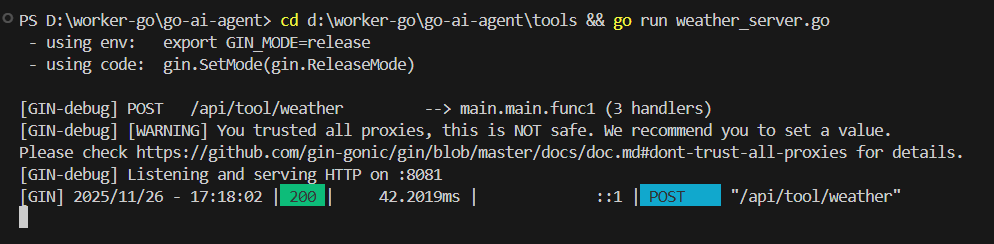
工具服务将在 `localhost:8081` 上启动,提供天气查询 API。

### 运行 Agent

```bash
cd agent
go run main.go
```

## 天气查询工具 API

工具通过 HTTP POST 方法提供服务:

- URL: `http://localhost:8081/api/tool/weather`
- 参数:
  ```json
  {
    "city": "北京"
  }
  ```
- 返回:
  ```json
  {
    "city": "北京",
    "date": "2023-08-20",
    "temperature": "22°C ~ 28°C",
    "condition": "晴",
    "uv_index": 5,
    "updated_at": "2023-08-19T10:00:00Z",
    "is_valid_trip": true
  }
  ```

## 通义千问 API 配置

项目使用环境变量来管理 API 密钥,确保敏感信息不会被硬编码在代码中。

在 `.env` 文件中配置你的 API Key:
```env
DASHSCOPE_API_KEY=your_actual_api_key_here
```

## 核心代码说明

### Agent 部分 ([agent/main.go](file:///d%3A/worker-go/go-ai-agent/agent/main.go))

主要包含以下功能:
1. 从环境变量加载 API 密钥
2. 初始化通义千问客户端
3. 构造 Prompt 并调用通义千问 API
4. 解析通义千问响应,判断是否需要调用工具
5. 调用天气查询工具
6. 根据工具返回结果生成最终回答

特别说明:近期修复了对 DashScope API 响应格式的解析逻辑。原先的实现假设模型直接返回工具调用指令,但实际上 DashScope API 会在响应的 `choices[0].message.content` 字段中包装实际内容。新的实现能够正确解析这种嵌套结构,提取真正的工具调用指令。

### 工具部分 ([tools/weather_server.go](file:///d%3A/worker-go/go-ai-agent/tools/weather_server.go))

主要包含以下功能:
1. 提供 HTTP API 接口
2. 解析城市参数
3. 模拟天气数据(实际项目中可替换为真实天气 API)
4. 返回结构化天气信息

## 扩展建议

如果你想基于这个演示项目进行扩展,可以考虑以下方向:

1. **集成真实天气 API**:替换模拟数据,接入真实的天气服务(如高德、百度天气 API)
2. **增加更多城市支持**:扩展不同城市的天气数据和出游建议
3. **丰富天气信息**:添加风力、湿度、空气质量等更多信息
4. **添加对话历史管理**:支持多轮天气查询对话
5. **实现工具结果缓存**:避免重复查询同一城市的天气
6. **添加错误处理和重试机制**:提高系统稳定性
7. **支持更多工具类型**:扩展 Agent 的能力范围,例如新闻查询、股票信息等
7.5、运行步骤
7.5.1、第一步:启动天气工具服务
cd tool
go run weather_server.go
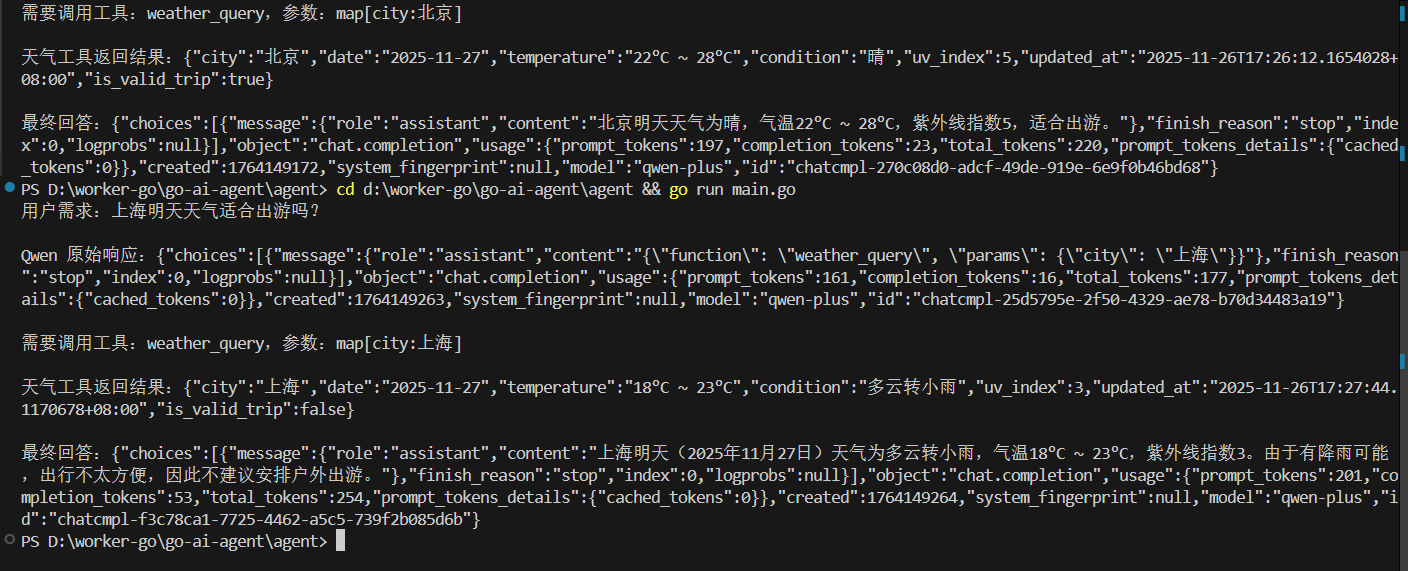
7.5.2、第二步:启动 Agent 程序
cd agent
go run main.go


 浙公网安备 33010602011771号