


完整教程:HarmonyOS 顶部双导航实战
HarmonyOS 顶部双导航实战:从零实现到可运行
目标:实现“顶部双层导航(一级频道 + 二级分类)+ 过滤展示内容”的示例页,且不暴露任何原项目逻辑/数据。读者可按本文步骤,在本项目 shuangdaohang 中复现同样效果。
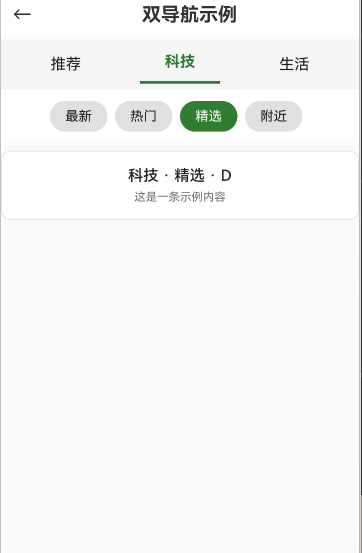
最终效果
- 顶部第一行:平铺 Tab(推荐/科技/生活),下划线高亮当前项。
- 顶部第二行:可横向滚动的 Chips(最新/热门/精选/附近)。
- 内容区:根据“一级频道 + 二级分类”的组合过滤并展示卡片列表。
- 返回按钮:从示例页返回首页。
1. 环境要求
- DevEco Studio(建议最新稳定版)
- HarmonyOS SDK(与项目模板兼容)
- 已打开本项目:d:\csdn\shuangdaohang
2. 注册页面路由(必做)
文件:entry/src/main/resources/base/profile/main_pages.json
确保包含示例页面路径:
{
"src": [
"pages/Index",
"pages/doublenav/DoubleNavDemo"
]
}
如无该路径,请添加保存后再编译。
3. 创建示例页面 DoubleNavDemo
路径:entry/src/main/ets/pages/doublenav/DoubleNavDemo.ets
说明:
- 使用
@Entry @Component定义页面。 - 两级导航分别使用 Row + Text/Divider 和 横向 Scroll + Chips 组合实现。
- 使用模拟数据(primary/secondary 字段)进行前端过滤,避免依赖任何外部数据。
完整代码(可直接复制覆盖):
import { router } from '@kit.ArkUI'
@Entry
@Component
struct DoubleNavDemo {
// 顶部一级导航:示例频道
private primaryTabs: string[] = ['推荐', '科技', '生活']
@State selectedPrimary: string = '推荐'
// 顶部二级导航:示例分类
private secondaryTabs: string[] = ['最新', '热门', '精选', '附近']
@State selectedSecondary: string = '最新'
// 模拟数据(不包含原项目的任何数据与逻辑)
private mockItems: { id: string, title: string, desc: string, primary: string, secondary: string }[] = [
{ id: '1', title: '推荐 · 最新 · A', desc: '这是一条示例内容', primary: '推荐', secondary: '最新' },
{ id: '2', title: '推荐 · 热门 · B', desc: '这是一条示例内容', primary: '推荐', secondary: '热门' },
{ id: '3', title: '科技 · 最新 · C', desc: '这是一条示例内容', primary: '科技', secondary: '最新' },
{ id: '4', title: '科技 · 精选 · D', desc: '这是一条示例内容', primary: '科技', secondary: '精选' },
{ id: '5', title: '生活 · 附近 · E', desc: '这是一条示例内容', primary: '生活', secondary: '附近' },
{ id: '6', title: '生活 · 热门 · F', desc: '这是一条示例内容', primary: '生活', secondary: '热门' },
]
private get filtered(): { id: string, title: string, desc: string }[] {
return this.mockItems
.filter(it => it.primary === this.selectedPrimary && it.secondary === this.selectedSecondary)
.map(it => ({ id: it.id, title: it.title, desc: it.desc }))
}
build() {
Column() {
// 顶部安全区占位
Row().width('100%').height(0).expandSafeArea([SafeAreaType.SYSTEM], [SafeAreaEdge.TOP])
// 顶部标题栏
Row() {
Button() { Text('←').fontSize(20) }
.type(ButtonType.Normal)
.backgroundColor(Color.Transparent)
.onClick(() => router.back())
Text('双导航示例')
.fontSize(20)
.fontWeight(FontWeight.Bold)
.layoutWeight(1)
.textAlign(TextAlign.Center)
Blank()
}
.width('100%')
.height(52)
.padding({ left: 12, right: 12 })
// 一级导航(Tab)
Row() {
ForEach(this.primaryTabs, (label: string) => {
Column() {
Text(label)
.fontSize(16)
.fontWeight(this.selectedPrimary === label ? FontWeight.Bold : FontWeight.Normal)
.fontColor(this.selectedPrimary === label ? '#2E7D32' : '#212121')
.padding({ left: 8, right: 8, top: 8, bottom: 8 })
.textAlign(TextAlign.Center)
if (this.selectedPrimary === label) {
Divider().strokeWidth(3).color('#2E7D32').width('70%').margin({ top: 3 })
}
}
.layoutWeight(1)
.onClick(() => this.selectedPrimary = label)
})
}
.width('100%')
.padding({ left: 8, right: 8, top: 6, bottom: 6 })
.backgroundColor('#F5F5F5')
// 二级导航(Chips,可横向滚动)
Scroll() {
Row() {
ForEach(this.secondaryTabs, (label: string) => {
Text(label)
.fontSize(14)
.fontColor(this.selectedSecondary === label ? '#FFFFFF' : '#212121')
.padding({ left: 16, right: 16, top: 8, bottom: 8 })
.backgroundColor(this.selectedSecondary === label ? '#2E7D32' : '#E0E0E0')
.borderRadius(16)
.margin({ right: 8 })
.onClick(() => this.selectedSecondary = label)
})
}
.padding(12)
}
.scrollable(ScrollDirection.Horizontal)
// 内容列表
Column() {
if (this.filtered.length === 0) {
Column() {
Text('暂无数据').fontSize(14).fontColor('#757575')
}
.width('100%').padding(40).justifyContent(FlexAlign.Center).alignItems(HorizontalAlign.Center)
} else {
ForEach(this.filtered, (item) => {
Column() {
Text(item.title)
.fontSize(16)
.fontWeight(FontWeight.Medium)
.fontColor('#212121')
.margin({ bottom: 6 })
Text(item.desc)
.fontSize(12)
.fontColor('#757575')
}
.width('100%')
.padding(16)
.backgroundColor('#FFFFFF')
.borderRadius(10)
.margin({ left: 12, right: 12, top: 8 })
.border({ width: 1, color: '#E0E0E0' })
})
}
}
.layoutWeight(1)
.width('100%')
.backgroundColor('#FAFAFA')
}
.width('100%')
.height('100%')
.backgroundColor('#FFFFFF')
}
}
4. 首页添加入口(可选)
文件:entry/src/main/ets/pages/Index.ets
添加按钮跳转到示例页:
import { router } from '@kit.ArkUI'
Button('打开双导航示例')
.onClick(() => router.pushUrl({ url: 'pages/doublenav/DoubleNavDemo' }))
你也可在 EntryAbility 里直接加载示例页用于演示:
windowStage.loadContent('pages/doublenav/DoubleNavDemo')5. 编译与运行
- DevEco Studio > Build > Build App(s)
- Run(或 Shift + F10)
打开首页,点击“打开双导航示例”进入演示页。
6. 验证要点
- 点击一级导航 Tab,观察下划线与内容过滤变化。
- 点击二级 Chips,内容按组合条件同步变化。
- 空结果时显示“暂无数据”。
- 返回按钮可返回首页。
7. 可扩展性建议
- 增加主题适配:引入
@StorageProp('app_is_dark_mode')动态切换颜色。 - 远程数据:用接口返回的
primary/secondary字段替换本地mockItems。 - 动态 Chips:根据接口动态生成二级导航数组。
- 路由参数:支持通过路由参数预选某个一级/二级导航。
8. 故障排查
- 报错“can’t find this page … path”:
- 检查
main_pages.json是否已注册pages/doublenav/DoubleNavDemo。
- 检查
- 点击无反应:
- 检查是否已导入
router,URL 是否与main_pages.json一致。
- 检查是否已导入
- 页面样式异常:
- 检查外层容器
.width('100%').height('100%')是否设置,必要时添加背景色。
- 检查外层容器
9. 版权与安全
- 本示例仅展示 UI 交互与前端过滤逻辑,数据为模拟生成,不包含也不依赖任何原项目的数据与业务逻辑。
完成以上步骤,你即可在本项目中复现一个“顶部双导航”的完整可运行示例。祝开发顺利!
项目地址
https://gitcode.com/daleishen/shuangdaohang/
班级地址
https://developer.huawei.com/consumer/cn/training/classDetail/fd34ff9286174e848d34cde7f512ce22?type=1%3Fha_source%3Dhmosclass&ha_sourceId=89000248

 浙公网安备 33010602011771号