


piontTransformerV3 训练自定义数据
参考代码:https://github.com/Pointcept/PointTransformerV3
简化版本:https://github.com/parkie0517/PointTransformerV3-SemSeg
一、环境配置
1.1 本机环境
python 3.7.16
cuda 11.0
unbuntu 18.04
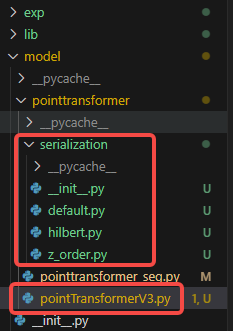
前面已经介绍了如何配置PointTransformerV1环境,所以这里环境安装就没那么复杂了,在v1代码基础上,直接将参考代码中的serialization文件夹和pointTransformerV3.py复制到model/pointtransformer目录下。
1.2 安装缺失库
conda install addict timm -c conda-forge -y
conda install pytorch-scatter -c pyg -y
pip install spconv-cu113
conda install ninja -y
pip install flash-attn==1.0.9
注意,由于本机环境cuda是11.0,而flash_attn新版要求CUDA和Pytorch版本和本机环境不匹配,所以这里安装的是1.0.9版本,但该版本没有'flash_attn_varlen_qkvpacked_func'方法,运行会报错,我这里没有升级cuda和pytorch版本。后续运行如果没有安装flash_attn库的需要将PointTransformerV3的enable_flash设为False。
直接pip install flash-attn在我的环境下会以下错误。
RuntimeError: FlashAttention is only supported on CUDA 11.6 and above.  Note: make sure nvcc has a supported version by running nvcc -V.
torch.__version__  = 1.9.0+cu111
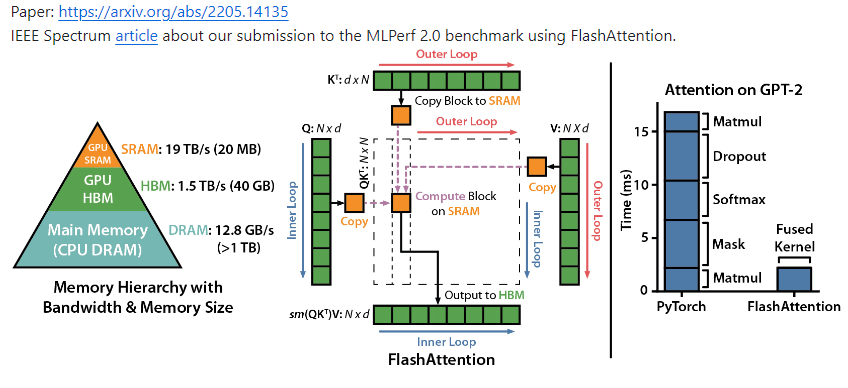
Flash Attention是一种针对Transformer模型中注意力机制的高效计算方法,通过分块计算和内存访问优化显著提升计算速度并降低内存消耗。
二、验证
2.1 添加分割头
自带的模型文件中还缺少分割头,应该需要添加(最新版本放在:https://github.com/Pointcept/Pointcept/blob/main/pointcept/models/default.py#L45)
在PointTransformerV3类中添加n_cls属性和分割头
class PointTransformerV3(PointModule):
    def __init__(
        self,
        in_channels=6,
        n_cls = 4,
        ***
    ):
        ***
        self.seg_head = nn.Sequential(
            nn.Linear(dec_channels[0], dec_channels[0]),
            nn.BatchNorm1d(dec_channels[0]),
            nn.ReLU(inplace=True),
            nn.Linear(dec_channels[0], n_cls)
            )
2.2 代码兼容
为了兼容V3和V1代码,前推部分作了修改:
def forward(self, pxo, grid_size = 0.05):
        """
        A data_dict is a dictionary containing properties of a batched point cloud.
        It should contain the following properties for PTv3:
        1. "feat": feature of point cloud
        2. "grid_coord": discrete coordinate after grid sampling (voxelization) or "coord" + "grid_size"
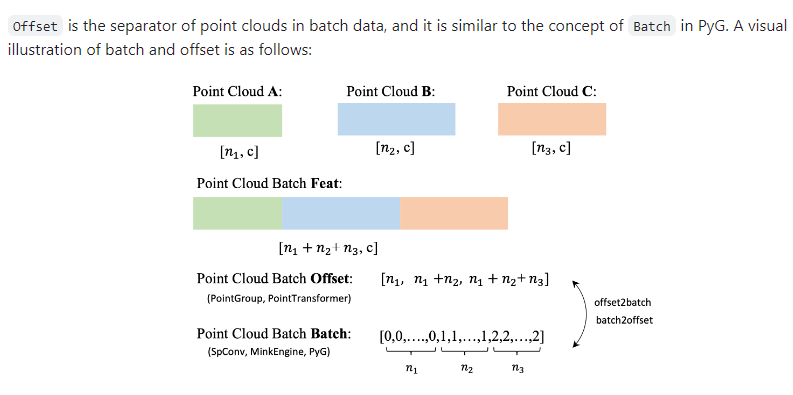
        3. "offset" or "batch": https://github.com/Pointcept/Pointcept?tab=readme-ov-file#offset
        """
        p0, x0, o0 = pxo  # (n, 3), (n, c), (b)
        data_dict = {}
        data_dict["feat"] = x0
        data_dict["coord"] = p0
        data_dict["offset"] = o0
        data_dict["grid_size"] = grid_size
        point = Point(data_dict)
        print("point: ", point)
        point.serialization(order=self.order, shuffle_orders=self.shuffle_orders)
        print("point serialization: ", point)
        point.sparsify()
        print("point sparsify: ", point)
        point = self.embedding(point)
        point = self.enc(point)
        if not self.cls_mode:
            point = self.dec(point)
        x = self.seg_head(point.feat)
        return x
2.3 编写测试代码
if __name__ == "__main__":
    import sys
    import os
    sys.path.append(os.path.dirname(os.path.dirname(__file__)))
    coord, feat, label =  torch.rand(80000, 3).to("cuda"), torch.rand(80000, 9).to("cuda"), torch.randint(0, 4, (80000,)).to("cuda")
    offset = torch.tensor([40000, 80000]).to("cuda")

    model = PointTransformerV3(in_channels=9, n_cls=4)
    model.to("cuda")
    out = model((coord, feat, offset))
    print(out)
2.4 启动方式
python -m model.pointtransformer.pointTransformerV3
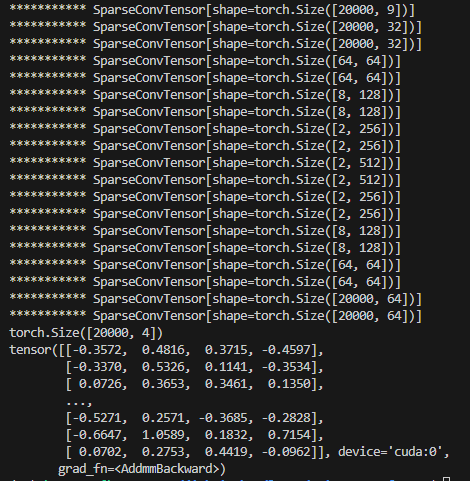
- 中间输出

# default.py
if batch is not None:
        batch = batch.long()
        print("batch: ", batch, batch.shape, "depth: ", depth, "code: ", code, code.shape, "order: ", order)
        code = batch << depth * 3 | code
    return code


# Spconv module
            elif spconv.modules.is_spconv_module(module):
                if isinstance(input, Point):
                    print("***********", input.sparse_conv_feat)
                    input.sparse_conv_feat = module(input.sparse_conv_feat)
                    input.feat = input.sparse_conv_feat.features
                else:
                    input = module(input)
三、相关问题
3.1 TypeError
- 错误
bitpack_mask = 1 << torch.arange(0, 8).to(locs.device)
TypeError: unsupported operand type(s) for <<: 'int' and 'Tensor'
- 解决方法
修改为:
bitpack_mask = torch.tensor(1, device=locs.device) << torch.arange(0, 8).to(locs.device)
3.2 RuntimeError
- 错误
locs_uint8 = locs.long().view(torch.uint8).reshape((-1, num_dims, 8)).flip(-1)
RuntimeError: Viewing a tensor as a new dtype with a different number of bytes per element is not supported.
- 解决方式
修改为:
locs_uint8 = locs.long().to(torch.uint8).reshape((-1, num_dims, 8)).flip(-1)

# Convert uint8s into uint64s.
hh_uint64 = hh_uint8.to(torch.int64).squeeze()  # hh_uint64 = hh_uint8.view(torch.int64).squeeze()
3.3 RuntimeError
- 错误
batch:  tensor([0, 0, 0,  ..., 1, 1, 1]) torch.Size([80000]) depth:  5 code:  tensor([4277, 4248, 3934,  ..., 5530, 8974,  425]) torch.Size([80000]) order:  z
batch:  tensor([0, 0, 0,  ..., 1, 1, 1]) torch.Size([80000]) depth:  5 code:  tensor([ 4403,  4392,  3822,  ...,  6572, 17038,   409]) torch.Size([80000]) order:  z-trans
batch:  tensor([0, 0, 0,  ..., 1, 1, 1]) torch.Size([80000]) depth:  5 code:  tensor([[171,  13,   0,  ...,   0,   0,   0],
        [ 11,   4,   0,  ...,   0,   0,   0],
        [237,   8,   0,  ...,   0,   0,   0],
        ...,
        [143, 116,   0,  ...,   0,   0,   0],
        [249,  15,   0,  ...,   0,   0,   0],
        [246,  11,   0,  ...,   0,   0,   0]]) torch.Size([10000, 8]) order:  hilbert
RuntimeError: The size of tensor a (80000) must match the size of tensor b (8) at non-singleton dimension 1
- 解决方法
hilbert序列化后维度不一致,修改encode最后一句,进行铺平处理
hh_uint64 = hh_uint8.to(torch.int64).flatten()
四、相关细节:
4.1 offset含义
4.2 序列化介绍
可以参考以下视频,对序列化有个初步了解
https://www.bilibili.com/video/BV1Sf4y147J9/?spm_id_from=333.337.search-card.all.click&vd_source=a36323d3893f862d9c1bc8ac1a8c9a42
4.3 flash_attn
如果环境不支持flash_attn,需要按照以下内容进行调整

调小enc_patch_size和dec_patch_size,并打开enable_rpe,upcast_attention, upcast_softmax。
4.4 pointcept库相关内容
-
scripts/train.sh
可选择配置文件$CONFIG_DIR,gpu个数$GPU,保存路径$EXP_DIR
内部调用的是tools/train.py文件 -
tools/train.py
def main_worker(cfg):
    cfg = default_setup(cfg)
    trainer = TRAINERS.build(dict(type=cfg.train.type, cfg=cfg))
    trainer.train()
Trainer类被pointcept/utils/registry.py装饰
Registered object could be built from registry.
    Example:
        >>> MODELS = Registry('models')
        >>> @MODELS.register_module()
        >>> class ResNet:
        >>>     pass
        >>> resnet = MODELS.build(dict(type='ResNet'))
通过实现build_model、build_train_loader等接口配置模型和数据, 如config/scannet/semseg-pt-v1-0-base.py.py),主要配置模型的输入,类别数以及不同数据类型的配置

 浙公网安备 33010602011771号