
C# 调用WGC 实现桌面屏幕的捕获
前言
最近在开发关于屏幕共享相关的功能,基于Windows的技术栈,和调研了Winodws现有提供的相关的技术,所以选择了Windows的 Windows Graphics Capture 技术,用于屏幕的捕获。
Windows的 Windows Graphics Capture 技术,微软的官方提供了很详细的文档,如右边的链接:屏幕截图 - UWP applications | Microsoft Learn
封装WgcCapture组件
为了方便扩展,该模块的实现组件化
1、定义接口
IWindowsGraphicsCapture 接口
    /// <summary>
    /// WindowsGraphicsCapture API接口
    /// </summary>
    internal interface IWindowsGraphicsCapture : ICapture
    {
        /// <summary>
        /// 捕获项关闭事件
        /// </summary>
        event EventHandler<GraphicsCaptureItem> ItemClosed;
    }
ICapture 接口
    /// <summary>
    /// 图像捕获接口
    /// </summary>
    public interface ICapture:IDisposable
    {
        /// <summary>
        /// 输出数据像素格式,默认为BGRA32
        /// </summary>
        PixelFormat PixelFormat { get; set; }

        /// <summary>
        /// 捕获图像大小,默认为捕获源大小,,建议按原始比例设置
        /// </summary>
        Size CaptureSize { get; set; }

        /// <summary>
        /// 新帧到达事件
        /// </summary>
        event EventHandler<CaptureFrame> FrameArrived;

        /// <summary>
        /// 开始捕获
        /// </summary>
        void StartCapture(bool startMonitor = true);

        /// <summary>
        /// 停止捕获
        /// </summary>
        void StopCapture();

        /// <summary>
        /// 获取下一帧图像数据
        /// </summary>
        /// <param name="captureFrame"></param>
        /// <returns></returns>
        bool TryGetNextFrame(out CaptureFrame captureFrame);

        /// <summary>
        /// 捕获源类型
        /// </summary>
        SourceType SourceType { get; }

        /// <summary>
        /// 捕获源大小
        /// </summary>
        Size SourceSize { get; }
    }
2、定义WgcCapture抽象类
/// <summary>
/// Windows Graphics Capture类(屏幕、窗口截图)
/// </summary>
public abstract class WgcCapture : IWindowsGraphicsCapture, IDisposable
{
    #region 公共属性

    /// <summary>
    /// 输出数据像素格式,默认为BGRA32
    /// </summary>
    public PixelFormat PixelFormat { get; set; } = PixelFormat.Bgra32;

    /// <summary>
    ///  捕获图像大小,默认为捕获源大小
    /// </summary>
    public Size CaptureSize { get; set; }

    /// <summary>
    /// 捕获源
    /// </summary>
    public GraphicsCaptureItem Item { get; private set; }

    /// <summary>
    /// 捕获源类型
    /// </summary>
    public SourceType SourceType { get; protected set; }

    /// <summary>
    /// 捕获源大小
    /// </summary>
    public Size SourceSize { get; protected set; }

    #endregion

    #region 公共事件

    /// <summary>
    /// 新帧到达事件
    /// </summary>
    public event EventHandler<CaptureFrame> FrameArrived;

    /// <summary>
    /// 捕获项关闭事件
    /// </summary>
    public event EventHandler<GraphicsCaptureItem> ItemClosed;

    #endregion

    #region 私有字段

    private Device _device;
    private IDirect3DDevice _d3dDevice;
    private Direct3D11CaptureFramePool _framePool;
    private SizeInt32 _lastSize;
    private GraphicsCaptureSession _session;
    private Texture2D _desktopImageTexture;

    #endregion

    /// <summary>
    /// 初始化
    /// </summary>
    /// <param name="item"></param>
    /// <param name="isSubscribePoolReceived"></param>
    protected void Init(GraphicsCaptureItem item,bool isSubscribePoolReceived)
    {
        if (!GraphicsCaptureSession.IsSupported())
        {
            throw new CaptureException("不支Windows Graphics Capture API");
        }

        Item = item;

        _d3dDevice = Direct3D11Helper.CreateDevice();

        _device = Direct3D11Helper.CreateSharpDxDevice(_d3dDevice);
        _framePool = Direct3D11CaptureFramePool.Create(
            _d3dDevice,
            pixelFormat: DirectXPixelFormat.B8G8R8A8UIntNormalized,
            numberOfBuffers: 2,
            Item.Size);
        _session = _framePool.CreateCaptureSession(Item);
        _lastSize = Item.Size;
        _desktopImageTexture = CreateTexture2D(_device, Item.Size);

        if (isSubscribePoolReceived)
        {
            _framePool.FrameArrived += OnFrameArrived;
        }
        Item.Closed += Item_Closed;
    }

    private void Item_Closed(GraphicsCaptureItem sender, object args)
    {
        Item.Closed -= Item_Closed;
        _framePool.FrameArrived -= OnFrameArrived;
        StopCapture();
        ItemClosed?.Invoke(this, sender);
    }


    /// <summary>
    /// 释放
    /// </summary>
    public void Dispose()
    {
        _session?.Dispose();
        _framePool?.Dispose();
        _desktopImageTexture?.Dispose();
        _device?.Dispose();
        _d3dDevice.Dispose();
    }

    /// <summary>
    /// 开始捕获
    /// </summary>
    public void StartCapture(bool startMonitor = false)
    {
        //去除黄色边框
        _session.IsBorderRequired = false;
        _session.StartCapture();
    }

    /// <summary>
    /// 停止捕获
    /// </summary>
    public void StopCapture()
    {
        Dispose();
        Item = null;
        _session = null;
        _framePool = null;
    }

    /// <summary>
    /// 获取下一帧数据
    /// </summary>
    /// <returns></returns>
    public bool TryGetNextFrame(out CaptureFrame captureFrame)
    {
        captureFrame = null;
        try
        {
            var newSize = false;
            using var frame = _framePool.TryGetNextFrame();
            if (frame == null)
            {
                return false;
            }

            //获取桌面的一帧的数据

            SourceSize = new Size(frame.ContentSize.Width, frame.ContentSize.Height);
            if (frame.ContentSize.Width != _lastSize.Width || frame.ContentSize.Height != _lastSize.Height)
            {
                newSize = true;
                _lastSize = frame.ContentSize;
                _desktopImageTexture.Dispose();
                _desktopImageTexture = CreateTexture2D(_device, frame.ContentSize);
            }

            var data = CopyFrameToBytes(frame);
            if (data == null)
            {
                return false;
            }

            captureFrame = new CaptureFrame(CaptureSize, PixelFormat, data);
            if (newSize)
            {
                _framePool.Recreate(_d3dDevice, DirectXPixelFormat.B8G8R8A8UIntNormalized, 2, _lastSize);
            }

            return true;
        }
        catch (Exception)
        {
            return false;
        }
    }

    private void OnFrameArrived(Direct3D11CaptureFramePool sender, object args)
    {
        var isGetNextFrame = TryGetNextFrame(out var captureFrame);
        if (isGetNextFrame)
        {
            FrameArrived?.Invoke(this, captureFrame);
        }
    }


    private byte[] CopyFrameToBytes(Direct3D11CaptureFrame frame)
    {
        using var bitmap = Direct3D11Helper.CreateSharpDxTexture2D(frame.Surface);
        _device.ImmediateContext.CopyResource(bitmap, _desktopImageTexture);

        // 将Texture2D资源映射到CPU内存
        var mappedResource = _device.ImmediateContext.MapSubresource(_desktopImageTexture, 0, MapMode.Read, MapFlags.None);
        var bytesPerPixel = PixelFormat switch
        {
            PixelFormat.Bgra32 => 4,
            PixelFormat.Bgr24 => 3,
            _ => throw new ArgumentOutOfRangeException(nameof(PixelFormat), PixelFormat, null)
        };
        var width = _desktopImageTexture.Description.Width;
        var height = _desktopImageTexture.Description.Height;
        using var inputRgbaMat = new Mat(height, width, MatType.CV_8UC4, mappedResource.DataPointer, mappedResource.RowPitch);

        var data = new byte[CaptureSize.Width * CaptureSize.Height * bytesPerPixel];
        if (CaptureSize.Width != width || CaptureSize.Height != height)
        {
            var size = new OpenCvSharp.Size(CaptureSize.Width, CaptureSize.Height);
            Cv2.Resize(inputRgbaMat, inputRgbaMat, size, interpolation: InterpolationFlags.Linear);
        }

        if (PixelFormat == PixelFormat.Bgr24)
        {
            using var inputRgbMat = new Mat();
            Cv2.CvtColor(inputRgbaMat, inputRgbMat, ColorConversionCodes.BGRA2BGR);
            Marshal.Copy(inputRgbMat.Data, data, 0, data.Length);
        }
        else
        {
            if (CaptureSize == SourceSize)
            {
                var rowPitch = mappedResource.RowPitch;
                for (var y = 0; y < height; y++)
                {
                    var srcRow = inputRgbaMat.Data + y * rowPitch;
                    var destRowOffset = y * width * bytesPerPixel;
                    Marshal.Copy(srcRow, data, destRowOffset, width * bytesPerPixel);
                }
            }
            else
            {
                Marshal.Copy(inputRgbaMat.Data, data, 0, data.Length);
            }
        }

        if (_desktopImageTexture.IsDisposed)
        {
            return null;
        }

        _device?.ImmediateContext?.UnmapSubresource(_desktopImageTexture, 0);
        return data;
    }

    private Texture2D CreateTexture2D(Device device, SizeInt32 size)
    {
        return new Texture2D(device, new Texture2DDescription
        {
            CpuAccessFlags = CpuAccessFlags.Read,
            BindFlags = BindFlags.None,
            Format = Format.B8G8R8A8_UNorm,
            Width = size.Width,
            Height = size.Height,
            OptionFlags = ResourceOptionFlags.None,
            MipLevels = 1,
            ArraySize = 1,
            SampleDescription = { Count = 1, Quality = 0 },
            Usage = ResourceUsage.Staging
        });
    }
}
3、MonitorWgcCapture实现
    /// <summary>
    /// 屏幕捕获类
    /// </summary>
    internal class MonitorWgcCapture : WgcCapture
    {
        /// <summary>
        /// 屏幕捕获
        /// </summary>
        public MonitorWgcCapture(IntPtr hmon, bool isSubscribePoolReceived)
        {
            if (!GraphicsCaptureSession.IsSupported())
            {
                throw new PlatformNotSupportedException("版本不支持WGC");
            }
            SourceType = SourceType.Screen;
            var item = CaptureHelper.CreateItemForMonitor(hmon);
            Init(item, isSubscribePoolReceived);
            SourceSize = new Size(item.Size.Width, item.Size.Height);
            CaptureSize = SourceSize;
        }
    }
4、辅助方法
    /// <summary>
    /// Capture辅助类
    /// </summary>
    public static class CaptureHelper
    {
        static readonly Guid GraphicsCaptureItemGuid = new Guid("79C3F95B-31F7-4EC2-A464-632EF5D30760");

        [ComImport]
        [Guid("3E68D4BD-7135-4D10-8018-9FB6D9F33FA1")]
        [InterfaceType(ComInterfaceType.InterfaceIsIUnknown)]
        interface IInitializeWithWindow
        {
            void Initialize(IntPtr hWnd);
        }

        [ComImport]
        [Guid("3628E81B-3CAC-4C60-B7F4-23CE0E0C3356")]
        [InterfaceType(ComInterfaceType.InterfaceIsIUnknown)]
        interface IGraphicsCaptureItemInterop
        {
            IntPtr CreateForWindow([In] IntPtr window, [In] ref Guid iid);

            IntPtr CreateForMonitor([In] IntPtr monitor, [In] ref Guid iid);
        }

#if NET5_0_OR_GREATER

        [Guid("00000035-0000-0000-C000-000000000046")]
        internal unsafe struct IActivationFactoryVftbl
        {
#pragma warning disable CS0649 // Field is never assigned to, and will always have its default value
            public readonly IInspectable.Vftbl IInspectableVftbl;
            private readonly void* _ActivateInstance;
#pragma warning restore

            public delegate* unmanaged[Stdcall]<IntPtr, IntPtr*, int> ActivateInstance => (delegate* unmanaged[Stdcall]<IntPtr, IntPtr*, int>)_ActivateInstance;
        }

        internal class Platform
        {
            [DllImport("api-ms-win-core-com-l1-1-0.dll")]
            internal static extern int CoDecrementMTAUsage(IntPtr cookie);

            [DllImport("api-ms-win-core-com-l1-1-0.dll")]
            internal static extern unsafe int CoIncrementMTAUsage(IntPtr* cookie);

            [DllImport("api-ms-win-core-winrt-l1-1-0.dll")]
            internal static extern unsafe int RoGetActivationFactory(IntPtr runtimeClassId, ref Guid iid, IntPtr* factory);
        }

        internal static class WinRtModule
        {
            private static readonly Dictionary<string, ObjectReference<IActivationFactoryVftbl>> Cache = new Dictionary<string, ObjectReference<IActivationFactoryVftbl>>();

            public static ObjectReference<IActivationFactoryVftbl> GetActivationFactory(string runtimeClassId)
            {
                lock (Cache)
                {
                    if (Cache.TryGetValue(runtimeClassId, out var factory))
                        return factory;

                    var m = MarshalString.CreateMarshaler(runtimeClassId);

                    try
                    {
                        var instancePtr = GetActivationFactory(MarshalString.GetAbi(m));

                        factory = ObjectReference<IActivationFactoryVftbl>.Attach(ref instancePtr);
                        Cache.Add(runtimeClassId, factory);

                        return factory;
                    }
                    finally
                    {
                        m.Dispose();
                    }
                }
            }

            private static unsafe IntPtr GetActivationFactory(IntPtr hstrRuntimeClassId)
            {
                if (s_cookie == IntPtr.Zero)
                {
                    lock (s_lock)
                    {
                        if (s_cookie == IntPtr.Zero)
                        {
                            IntPtr cookie;
                            Marshal.ThrowExceptionForHR(Platform.CoIncrementMTAUsage(&cookie));

                            s_cookie = cookie;
                        }
                    }
                }

                Guid iid = typeof(IActivationFactoryVftbl).GUID;
                IntPtr instancePtr;
                int hr = Platform.RoGetActivationFactory(hstrRuntimeClassId, ref iid, &instancePtr);

                if (hr == 0)
                    return instancePtr;

                throw new Win32Exception(hr);
            }

            public static bool ResurrectObjectReference(IObjectReference objRef)
            {
                var disposedField = objRef.GetType().GetField("disposed", BindingFlags.NonPublic | BindingFlags.Instance)!;
                if (!(bool)disposedField.GetValue(objRef)!)
                    return false;
                disposedField.SetValue(objRef, false);
                GC.ReRegisterForFinalize(objRef);
                return true;
            }

            private static IntPtr s_cookie;
            private static readonly object s_lock = new object();
        }

#endif

        /// <summary>
        /// 设置 GraphicsCapturePicker 的窗口句柄,以便捕获特定窗口的内容。
        /// </summary>
        /// <param name="picker">GraphicsCapturePicker 实例,用于启动窗口捕获。</param>
        /// <param name="hwnd"> 窗口句柄,指定要捕获的窗口。</param>
        public static void SetWindow(this GraphicsCapturePicker picker, IntPtr hwnd)
        {

#if NET5_0_OR_GREATER
            var  interop = picker.As<IInitializeWithWindow>();
#else
            var interop = (IInitializeWithWindow)(object)picker;
#endif

            interop.Initialize(hwnd);
        }

        /// <summary>
        /// 根据窗口句柄创建 GraphicsCaptureItem 实例。
        /// </summary>
        /// <param name="hWnd">窗口句柄,指定要捕获的窗口。</param>
        /// <returns>返回一个 GraphicsCaptureItem 实例,表示捕获的窗口。</returns>
        /// <exception cref="CaptureException">当窗口不存在时抛出异常</exception>
        public static GraphicsCaptureItem CreateItemForWindow(IntPtr hWnd)
        {
            try
            {
                GraphicsCaptureItem item = null;
#if NET5_0_OR_GREATER
                var factory = WinRtModule.GetActivationFactory("Windows.Graphics.Capture.GraphicsCaptureItem");
                var interop = factory.AsInterface<IGraphicsCaptureItemInterop>();
                var itemPointer = interop.CreateForWindow(hWnd, GraphicsCaptureItemGuid);
                item = GraphicsCaptureItem.FromAbi(itemPointer);
#else

                var factory = WindowsRuntimeMarshal.GetActivationFactory(typeof(GraphicsCaptureItem));
                var interop = (IGraphicsCaptureItemInterop)factory;
                var itemPointer = interop.CreateForWindow(hWnd, GraphicsCaptureItemGuid);
                item = Marshal.GetObjectForIUnknown(itemPointer) as GraphicsCaptureItem;
                Marshal.Release(itemPointer);

#endif
                return item;
            }
            catch (Exception)
            {
                throw new CaptureException("窗口不存在");
            }

        }

        /// <summary>
        /// 根据显示器句柄创建 GraphicsCaptureItem 实例。
        /// </summary>
        /// <param name="hmon">显示器句柄,指定要捕获的显示器。</param>
        /// <returns>显示器句柄,指定要捕获的显示器。</returns>
        /// <exception cref="CaptureException">当显示器句柄错误时抛出异常。</exception>
        public static GraphicsCaptureItem CreateItemForMonitor(IntPtr hmon)
        {
            try
            {
                GraphicsCaptureItem item = null;
#if NET5_0_OR_GREATER
                var factory = WinRtModule.GetActivationFactory("Windows.Graphics.Capture.GraphicsCaptureItem");
                var interop = factory.AsInterface<IGraphicsCaptureItemInterop>();
                var itemPointer = interop.CreateForMonitor(hmon, GraphicsCaptureItemGuid);
                item = GraphicsCaptureItem.FromAbi(itemPointer);
#else

                var factory = WindowsRuntimeMarshal.GetActivationFactory(typeof(GraphicsCaptureItem));
                var interop = (IGraphicsCaptureItemInterop)factory;
                var itemPointer = interop.CreateForMonitor(hmon, GraphicsCaptureItemGuid);
                item = Marshal.GetObjectForIUnknown(itemPointer) as GraphicsCaptureItem;
                Marshal.Release(itemPointer);

#endif
                return item;
            }
            catch (Exception)
            {
                throw new CaptureException("显示器句柄错误");
            }
        }
    }


    /// <summary>
    ///     D3D辅助类
    /// </summary>
    internal static class Direct3D11Helper
    {
        private static Guid IInspectable = new("AF86E2E0-B12D-4c6a-9C5A-D7AA65101E90");
        private static Guid ID3D11Resource = new("dc8e63f3-d12b-4952-b47b-5e45026a862d");
        private static Guid IDXGIAdapter3 = new("645967A4-1392-4310-A798-8053CE3E93FD");
        private static readonly Guid ID3D11Device = new("db6f6ddb-ac77-4e88-8253-819df9bbf140");
        private static readonly Guid ID3D11Texture2D = new("6f15aaf2-d208-4e89-9ab4-489535d34f9c");

        [DllImport("d3d11.dll", EntryPoint = "CreateDirect3D11DeviceFromDXGIDevice", SetLastError = true,
            CharSet = CharSet.Unicode, ExactSpelling = true, CallingConvention = CallingConvention.StdCall)]
        private static extern uint CreateDirect3D11DeviceFromDXGIDevice(IntPtr dxgiDevice, out IntPtr graphicsDevice);

        [DllImport("d3d11.dll", EntryPoint = "CreateDirect3D11SurfaceFromDXGISurface", SetLastError = true,
            CharSet = CharSet.Unicode, ExactSpelling = true, CallingConvention = CallingConvention.StdCall)]
        private static extern uint CreateDirect3D11SurfaceFromDXGISurface(IntPtr dxgiSurface, out IntPtr graphicsSurface);


        [ComImport]
        [Guid("A9B3D012-3DF2-4EE3-B8D1-8695F457D3C1")]
        [InterfaceType(ComInterfaceType.InterfaceIsIUnknown)]
        [ComVisible(true)]
        private interface IDirect3DDxgiInterfaceAccess
        {
            IntPtr GetInterface([In] ref Guid iid);
        }

        /// <summary>
        /// 创建硬件驱动类型的IDirect3DDevice实例
        /// </summary>
        /// <returns></returns>
        public static IDirect3DDevice CreateDevice()
        {
            return CreateDevice(false);
        }

        /// <summary>
        /// 创建一个使用指定设备类型(硬件或软件)的IDirect3DDevice实例。
        /// </summary>
        /// <param name="useWarp">创建一个使用指定设备类型(硬件或软件)的IDirect3DDevice实例。</param>
        /// <returns>返回使用指定驱动类型创建的IDirect3DDevice实例</returns>
        public static IDirect3DDevice CreateDevice(bool useWarp)
        {
            var d3dDevice = new Device(
                useWarp ? DriverType.Software : DriverType.Hardware,
                DeviceCreationFlags.BgraSupport);
            var device = CreateDirect3DDeviceFromSharpDxDevice(d3dDevice);
            return device;
        }

        /// <summary>
        /// 从 SharpDX.Direct3D11.Device 创建 IDirect3DDevice 实例。
        /// </summary>
        /// <param name="d3dDevice">SharpDX.Direct3D11.Device 对象。</param>
        /// <returns>返回一个 IDirect3DDevice 实例,表示从 SharpDX.Direct3D11.Device 创建的 Direct3D 设备。</returns>
        public static IDirect3DDevice CreateDirect3DDeviceFromSharpDxDevice(Device d3dDevice)
        {
            IDirect3DDevice device = null;

            // Acquire the DXGI interface for the Direct3D device.
            using var dxgiDevice = d3dDevice.QueryInterface<Device3>();
            // Wrap the native device using a WinRT interop object.
            var hr = CreateDirect3D11DeviceFromDXGIDevice(dxgiDevice.NativePointer, out var pUnknown);

            if (hr == 0)
            {

#if NET5_0_OR_GREATER
                device = MarshalInterface<IDirect3DDevice>.FromAbi( pUnknown );
#else
                device = Marshal.GetObjectForIUnknown(pUnknown) as IDirect3DDevice;
                Marshal.Release(pUnknown);
#endif
            }

            return device;
        }

        /// <summary>
        /// 从 SharpDX.Direct3D11.Texture2D 创建 IDirect3DSurface 实例。
        /// </summary>
        /// <param name="texture">SharpDX.Direct3D11.Texture2D 对象。</param>
        /// <returns>返回一个 IDirect3DSurface 实例,表示从 SharpDX.Direct3D11.Texture2D 创建的 Direct3D 表面。</returns>
        public static IDirect3DSurface CreateDirect3DSurfaceFromSharpDxTexture(Texture2D texture)
        {
            // Acquire the DXGI interface for the Direct3D surface.
            using var dxgiSurface = texture.QueryInterface<Surface>();
            // Wrap the native device using a WinRT interop object.
            var hr = CreateDirect3D11SurfaceFromDXGISurface(dxgiSurface.NativePointer, out var pUnknown);

            if (hr != 0) return null;

#if NET5_0_OR_GREATER
             var surface = MarshalInterface<IDirect3DSurface>.FromAbi( pUnknown );
#else
            var surface = Marshal.GetObjectForIUnknown(pUnknown) as IDirect3DSurface;
            Marshal.Release(pUnknown);
#endif
            return surface;
        }

        /// <summary>
        /// 从 IDirect3DDevice 创建 SharpDX.Direct3D11.Device 实例。
        /// </summary>
        /// <param name="device">IDirect3DDevice 对象。</param>
        /// <returns>返回一个 SharpDX.Direct3D11.Device 实例,表示从 IDirect3DDevice 创建的 SharpDX Direct3D 设备。</returns>
        public static Device CreateSharpDxDevice(IDirect3DDevice device)
        {
#if NET5_0_OR_GREATER
            var access = device.As<IDirect3DDxgiInterfaceAccess>();
#else
            var access = (IDirect3DDxgiInterfaceAccess)device;
#endif
            var d3dPointer = access.GetInterface(ID3D11Device);
            var d3dDevice = new Device(d3dPointer);
            return d3dDevice;
        }

        /// <summary>
        /// 从 IDirect3DSurface 创建 SharpDX.Direct3D11.Texture2D 实例。
        /// </summary>
        /// <param name="surface">IDirect3DSurface 对象。</param>
        /// <returns>返回一个 SharpDX.Direct3D11.Texture2D 实例,表示从 IDirect3DSurface 创建的 SharpDX Direct3D Texture2D。</returns>
        public static Texture2D CreateSharpDxTexture2D(IDirect3DSurface surface)
        {
#if NET5_0_OR_GREATER
            var access = surface.As<IDirect3DDxgiInterfaceAccess>();
#else
            var access = (IDirect3DDxgiInterfaceAccess)surface;
#endif
            var d3dPointer = access.GetInterface(ID3D11Texture2D);
            var d3dSurface = new Texture2D(d3dPointer);
            return d3dSurface;
        }
    }

    /// <summary>
    /// 图像捕获异常
    /// </summary>
    public class CaptureException : Exception
    {
        /// <summary>
        /// 图像捕获异常
        /// </summary>
        /// <param name="message"></param>
        public CaptureException(string message) : base(message) { }
    }


    /// <summary>
    /// 捕获图像帧信息
    /// </summary>
    public class CaptureFrame
    {
        /// <summary>
        /// 创建一帧图像信息
        /// </summary>
        /// <param name="size"></param>
        /// <param name="pixelFormat"></param>
        /// <param name="data"></param>
        public CaptureFrame(Size size, PixelFormat pixelFormat, byte[] data)
        {
            Size = size;
            PixelFormat = pixelFormat;
            Data = data;
        }

        /// <summary>
        /// 原始像素数据
        /// </summary>
        public byte[] Data { get; set; }

        /// <summary>
        /// 捕获图像大小
        /// </summary>
        public Size Size { get; set; }

        /// <summary>
        /// 捕获数据相识格式
        /// </summary>
        public PixelFormat PixelFormat { get; set; }
    }
5、调用
  var captureMonitor = GetMonitorInfo(whichMonitor);
  _capture = new MonitorWgcCapture(captureMonitor.Hmon, isSubscribePoolReceived);
  _capture?.StartCapture();
 _capture.FrameArrived += Capture_FrameArrived;


private MonitorInfo GetMonitorInfo(int whichMonitor)
  {
      var monitors = new ObservableCollection<MonitorInfo>(MonitorEnumerationHelper.GetMonitors());
      if (!monitors.Any())
      {
          throw new CaptureException("桌面捕获不可用");
      }

      if (whichMonitor > monitors.Count - 1)
      {
          throw new CaptureException("超出显示器个数");
      }

      var primaryMonitor = monitors.FirstOrDefault(x => x.IsPrimary);
      monitors.Remove(primaryMonitor);
      monitors.Insert(0, primaryMonitor);

      var captureMonitor = monitors[whichMonitor];
      return captureMonitor;
  }


 internal static class MonitorEnumerationHelper
 {
     private const int CCHDEVICENAME = 32;

     [DllImport("user32.dll")]
     private static extern bool EnumDisplayMonitors(IntPtr hdc, IntPtr lprcClip, EnumMonitorsDelegate lpfnEnum,
         IntPtr dwData);

     [DllImport("user32.dll", CharSet = CharSet.Auto)]
     private static extern bool GetMonitorInfo(IntPtr hMonitor, ref MonitorInfoEx lpmi);

     public static IEnumerable<MonitorInfo> GetMonitors()
     {
         var result = new List<MonitorInfo>();

         EnumDisplayMonitors(IntPtr.Zero, IntPtr.Zero,
             delegate(IntPtr hMonitor, IntPtr hdcMonitor, ref RECT lprcMonitor, IntPtr dwData)
             {
                 var mi = new MonitorInfoEx();
                 mi.Size = Marshal.SizeOf(mi);
                 var success = GetMonitorInfo(hMonitor, ref mi);
                 if (success)
                 {
                     var info = new MonitorInfo
                     {
                         ScreenSize =
                             new Vector2(mi.Monitor.right - mi.Monitor.left, mi.Monitor.bottom - mi.Monitor.top),
                         MonitorArea = new Rect(mi.Monitor.left, mi.Monitor.top, mi.Monitor.right - mi.Monitor.left,
                             mi.Monitor.bottom - mi.Monitor.top),
                         WorkArea = new Rect(mi.WorkArea.left, mi.WorkArea.top, mi.WorkArea.right - mi.WorkArea.left,
                             mi.WorkArea.bottom - mi.WorkArea.top),
                         IsPrimary = mi.Flags > 0,
                         Hmon = hMonitor,
                         DeviceName = mi.DeviceName
                     };
                     result.Add(info);
                 }

                 return true;
             }, IntPtr.Zero);
         return result;
     }

     private delegate bool EnumMonitorsDelegate(IntPtr hMonitor, IntPtr hdcMonitor, ref RECT lprcMonitor,
         IntPtr dwData);

     [StructLayout(LayoutKind.Sequential)]
     public struct RECT
     {
         public int left;
         public int top;
         public int right;
         public int bottom;
     }

     [StructLayout(LayoutKind.Sequential, CharSet = CharSet.Auto)]
     internal struct MonitorInfoEx
     {
         public int Size;
         public RECT Monitor;
         public RECT WorkArea;
         public uint Flags;

         [MarshalAs(UnmanagedType.ByValTStr, SizeConst = CCHDEVICENAME)]
         public string DeviceName;
     }
 }
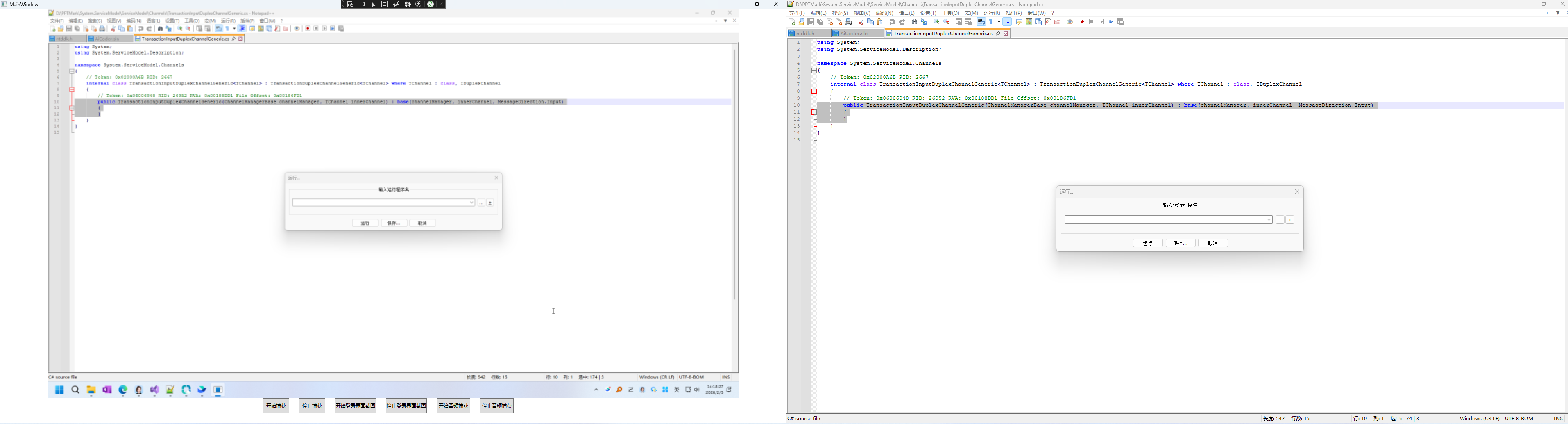
6、效果图如下:
注意点:
1、 由于本组件的封装使用了较新的Wgc的特性,去除捕获屏幕的黄色的边框的特性,所以在引用的TargetFrameworks中,需要显式的指向特定的版本 如下:
<TargetFrameworks>net6.0-windows10.0.22000.0;net472</TargetFrameworks>
2、本文调用了 SharpDX等第三方的组件
 <ItemGroup>
   <PackageReference Include="OpenCvSharp4.Windows" Version="4.8.0.20230708" />
   <PackageReference Include="SharpDX" Version="4.2.0" />
   <PackageReference Include="SharpDX.Direct3D11" Version="4.2.0" />
   <PackageReference Include="SharpDX.DXGI" Version="4.2.0" />
 </ItemGroup>

 浙公网安备 33010602011771号