


Vue3、AntDesign 季度多选
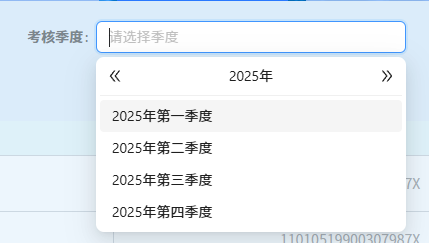
Picker.vue
<template>
	<a-select v-model:value="value" :options="formattedMonths.map(item => ({ value: item }))" mode="multiple" placeholder="请选择季度" style="width: 100%"
						@change="change">
		<template #dropdownRender="{ menuNode: menu }">
			<div class="select-time" style="padding: 4px 8px; cursor: pointer" @mousedown="e => e.preventDefault()">
				<DoubleLeftOutlined color="#d7d7d7" @click="handleLeftButtonClick" />
				<div>{{ currentYear }}年</div>
				<DoubleRightOutlined color="#d7d7d7" @click="handleRightButtonClick" />
			</div>
			<a-divider style="margin: 4px 0" />
			<v-nodes :vnodes="menu" />
		</template>
	</a-select>
</template>
<script>
import { DoubleLeftOutlined, DoubleRightOutlined, PlusOutlined } from '@ant-design/icons-vue'
import { computed, defineComponent, defineExpose, ref } from 'vue'
import dayjs from 'dayjs'

let index = 0
export default defineComponent({
	props: {
		types: {
			type: String,
			required: true,
			default: 1
		}
	},
	components: {
		PlusOutlined,
		DoubleLeftOutlined,
		DoubleRightOutlined,
		VNodes: (_, { attrs }) => {
			return attrs.vnodes
		}
	},
	setup(options, { emit }) {
		// 使用 ref 创建响应式变量
		let currentYear = ref(dayjs().format('YYYY'))
		const formattedMonths = computed(() => {
			let monthNames = null
			if (options.types === 1) {
				monthNames = ['一季度', '二季度', '三季度', '四季度']
			} else {
				monthNames = ['1月', '2月', '3月', '4月', '5月', '6月', '7月', '8月', '9月', '10月', '11月', '12月']
			}
			return monthNames.map(month => `${currentYear.value}年第${month}`)
		})
		const addItem = () => {
			console.log('addItem')
			// items.value.push(`New item ${index++}`);
		}
		const value = ref([])

		// 左切换按钮点击事件处理程序
		function handleLeftButtonClick() {
			currentYear.value = dayjs(currentYear.value).subtract(1, 'year').format('YYYY')
		}

		// 右切换按钮点击事件处理程序
		function handleRightButtonClick() {
			currentYear.value = dayjs(currentYear.value).add(1, 'year').format('YYYY')
		}

		function change(e) {
			emit('changeSelect', e)
		}

		defineExpose({
			value
		})

		return {
			value,
			formattedMonths,
			currentYear,
			handleLeftButtonClick,
			handleRightButtonClick,
			change
		}
	}
})
</script>

<style lang="scss">
.select-time {
	display: flex;
	padding: 3px 5px;
	box-sizing: border-box;
	align-items: center;
	justify-content: space-between;
}
</style>
使用
						<Picker  ref="pickerRef" :types="1"
										@changeSelect="onPickerChange" />
学而不思则罔,思而不学则殆!

 浙公网安备 33010602011771号