


when get data from request.POST or request.body
In Django, you can retrieve data from a request using either request.POST or request.body, depending on the content type of the request and how the data is being sent. Here’s a detailed explanation of when to use each:
1. Using request.POST
字典格式的form data
- When to Use: Use
request.POSTwhen your form is submitted via a standard HTML form submission (usingapplication/x-www-form-urlencodedormultipart/form-datacontent types). - How to Access: Data is accessed as a dictionary-like object.
-
def item_update(request, pk):
    if request.method == 'POST':
        name = request.POST.get('name')
        description = request.POST.get('description')
        # Process the data as needed
2. Using
request.body - 第三方前端推送,或者把这个form字典格式的form data
-
let person = {
    name: "张三",
    age: 30,
    city: "北京"
};

let jsonString = JSON.stringify(person);
console.log(jsonString); // 输出 '{"name":"张三","age":30,"city":"北京"}'
或者form
-
            fetch('{% url "myapp1:item_update" form.instance.id %}', {
                method: 'POST',
                headers: {
                    'Content-Type': 'application/json',
                    'X-CSRFToken': csrfToken
                },
                body: JSON.stringify(this.form)

            })
-
- When to Use: Use
request.bodywhen your request is sending JSON data (typically with theapplication/jsoncontent type) or when you are not using a standard form submission. - How to Access: You need to parse the raw body of the request because it will be a byte string. Use
json.loads()to convert it to a Python dictionary.-
import json
from django.http import JsonResponse

def item_update(request, pk):
    if request.method == 'POST':
        try:
            data = json.loads(request.body)  # Parse the JSON data
            name = data.get('name')
            description = data.get('description')
            # Process the data as needed
            return JsonResponse({'success': True})
        except json.JSONDecodeError:
            return JsonResponse({'error': 'Invalid JSON'}, status=400)
Summary of Differences
Feature request.POSTrequest.bodyUse Case Standard form submissions JSON data or raw body content Access Method Directly as a dictionary-like object Requires parsing with json.loads()Content-Type application/x-www-form-urlencodedormultipart/form-dataapplication/jsonConclusion
- Use
request.POSTfor traditional form submissions. - Use
request.bodywhen dealing with JSON or other raw data formats. - Ensure to handle errors (like JSON decoding errors) when using
request.body.
- Use
-
- When to Use: Use
如果你是从HTML表单接收数据,并且数据是通过编码为application/x-www-form-urlencoded的,使用request.POST。
如果你是从API客户端接收数据,并且数据是以JSON或其他格式编码的,使用request.body,然后根据实际情况解析数据
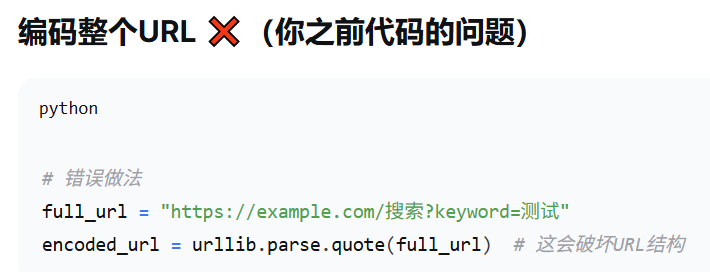
=============url的编码=====================
# JSON数据作为URL参数
data = '{"name":"张三","age":25}'
encoded_data = urllib.parse.quote(data)
url = f"https://api.example.com/user?data={encoded_data}"

错误用法:
===========django 和api的传参==================
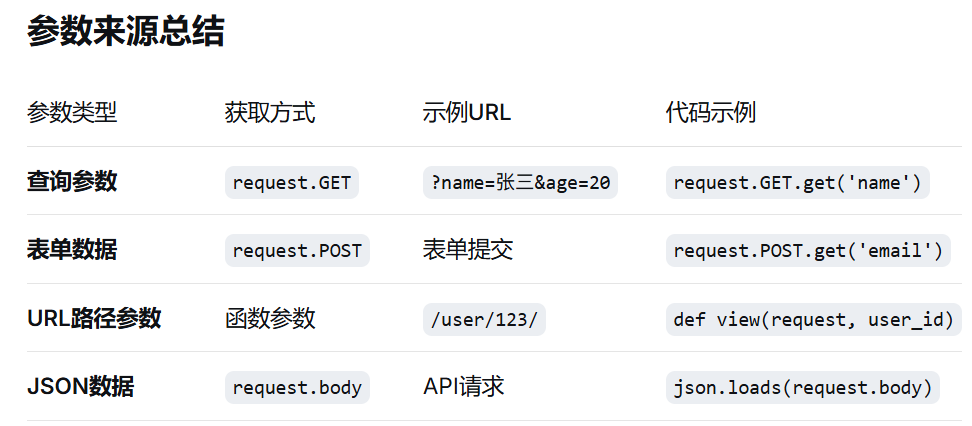
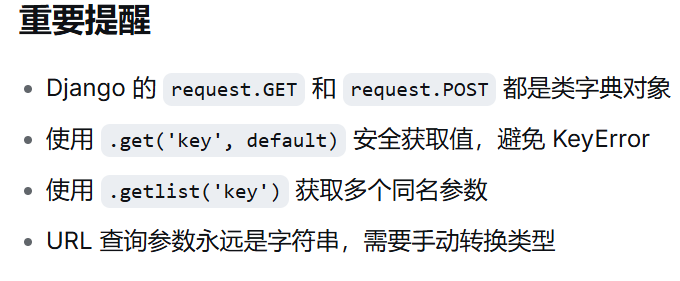
=======URL 参数永远是字符串
age = request.GET.get('age')
print(type(age))  # <class 'str'> - 注意是字符串!

=======https证书
# requests 默认会验证 SSL 证书
response = requests.post('https://api.example.com/data', json={'key': 'value'})
# 如果证书无效,会抛出 SSLError
测试环境:
# 方法1:完全跳过验证
response = requests.post('https://api.example.com/data',
                        json={'key': 'value'},
                        verify=False)

# 方法2:使用自定义 CA 证书包
response = requests.post('https://api.example.com/data',
                        json={'key': 'value'},
                        verify='/path/to/certfile.pem')
开发环境
# 使用客户端证书
response = requests.post('https://api.example.com/data',
                        cert=('/path/client.cert', '/path/client.key'))

# 或者使用 PKCS12 文件
response = requests.post('https://api.example.com/data',
                        cert='/path/client.p12',
                        verify=True)
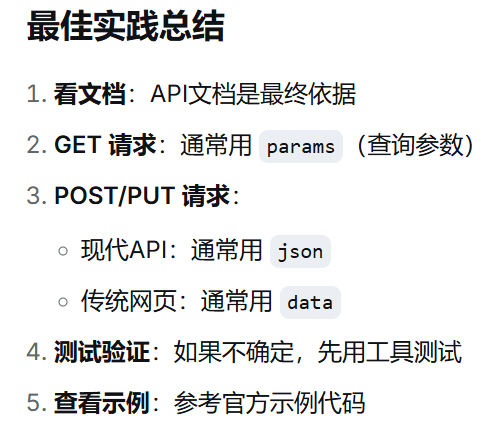
发送post请求时候,,参数是放在params,还是放data,还是json,需要看对方的接受方式
放在params
# 假设对方API文档说:GET /api/users?page=1&limit=20
import requests

response = requests.get(
    'https://api.example.com/users',
    params={
        'page': 1,
        'limit': 20,
        'search': '张三'
    }
)
放在body
# 假设对方API文档说:POST /api/login,Content-Type: application/x-www-form-urlencoded
response = requests.post(
    'https://api.example.com/login',
    data={
        'username': 'zhangsan',
        'password': '123456'
    }
)
放json
# 假设对方API文档说:POST /api/users,Content-Type: application/json
response = requests.post(
    'https://api.example.com/users',
    json={
        'name': '张三',
        'age': 25,
        'email': '[email protected]'
    }
)
案例1:搜索功能(通常用 params)
# ✅ 正确:搜索条件放在URL参数中
response = requests.get(
    'https://api.example.com/search',
    params={
        'q': 'Python教程',
        'category': 'technology',
        'page': 1,
        'sort': 'recent'
    }
)
# 实际URL: https://api.example.com/search?q=Python教程&category=technology&page=1&sort=recent
案例2:用户注册(通常用 json 或 data)
# ✅ 方式A:JSON(现代API)
response = requests.post(
    'https://api.example.com/register',
    json={
        'username': 'newuser',
        'password': 'securepass',
        'email': '[email protected]'
    }
)

# ✅ 方式B:表单数据(传统网页)
response = requests.post(
    'https://api.example.com/register',
    data={
        'username': 'newuser',
        'password': 'securepass',
        'email': '[email protected]'
    }
)
案例3:文件上传(用 files + data)
# 文件上传通常混合使用
with open('avatar.jpg', 'rb') as f:
    response = requests.post(
        'https://api.example.com/upload',
        files={'avatar': f},
        data={
            'user_id': 123,
            'description': '用户头像'
        }
    )
======================下面是请求与接收============================================
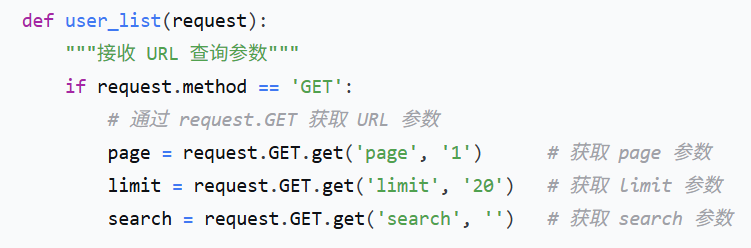
import requests

response = requests.get(
    'http://api.example.com/api/users/',
    params={  # 这个 params 会成为 URL 查询参数
        'page': 1,
        'limit': 20,
        'search': '张三'
    }
)
# 实际发送的URL: http://api.example.com/api/users/?page=1&limit=20&search=张三
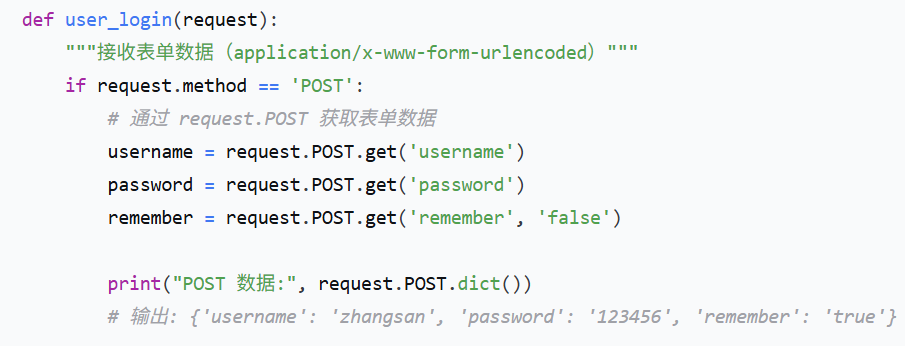
import requests

response = requests.post(
    'http://api.example.com/api/login/',
    data={  # 这个 data 会成为表单数据
        'username': 'zhangsan',
        'password': '123456',
        'remember': 'true'
    }
)
# 请求头: Content-Type: application/x-www-form-urlencoded
# 请求体: username=zhangsan&password=123456&remember=true
json请求
import requests

response = requests.post(
    'http://api.example.com/api/users/create/',
    json={  # 这个 json 会成为 JSON 数据
        'username': 'lisi',
        'email': '[email protected]',
        'age': 25
    }
)
# 请求头: Content-Type: application/json
# 请求体: {"username": "lisi", "email": "[email protected]", "age": 25}
json接收
from django.views.decorators.csrf import csrf_exempt
from django.http import JsonResponse
import json

@csrf_exempt
def create_user(request):
    """接收 JSON 数据"""
    if request.method == 'POST':
        # 通过 request.body 获取原始数据,然后解析 JSON
        try:
            data = json.loads(request.body.decode('utf-8'))

            username = data.get('username')
            email = data.get('email')
            age = data.get('age')

            print("JSON 数据:", data)
            # 输出: {'username': 'lisi', 'email': '[email protected]', 'age': 25}

            # 创建用户
            user = User.objects.create(
                username=username,
                email=email,
                age=age
            )

            return JsonResponse({'success': True, 'user_id': user.id})

        except json.JSONDecodeError:
            return JsonResponse({'success': False, 'error': '无效的JSON数据'})
Django 根据 请求头 Content-Type 来判断:
# Django 内部处理逻辑示意
def handle_request(request):
    content_type = request.META.get('CONTENT_TYPE', '')

    if request.method == 'GET':
        # GET 请求:参数在 request.GET 中
        params = request.GET

    elif 'application/x-www-form-urlencoded' in content_type:
        # 表单数据:在 request.POST 中
        form_data = request.POST

    elif 'application/json' in content_type:
        # JSON 数据:需要解析 request.body
        json_data = json.loads(request.body)

    elif 'multipart/form-data' in content_type:
        # 文件上传:在 request.FILES 中
        files = request.FILES
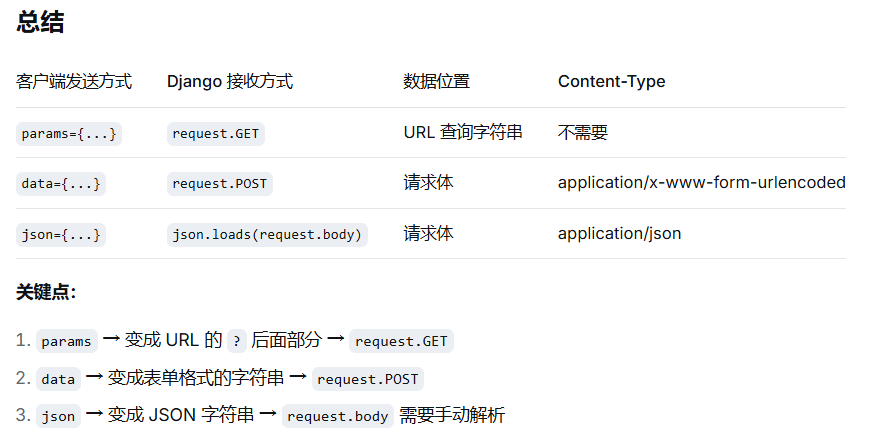
import requests

# 方式1:URL 参数(GET 请求)
response1 = requests.get(
    'http://api.example.com/api/search/',
    params={'q': 'python', 'page': 1}  # → request.GET
)

# 方式2:表单数据(POST 请求)
response2 = requests.post(
    'http://api.example.com/api/login/',
    data={'user': 'admin', 'pass': '123'},  # → request.POST
    headers={'Content-Type': 'application/x-www-form-urlencoded'}
)

# 方式3:JSON 数据(POST 请求)
response3 = requests.post(
    'http://api.example.com/api/users/',
    json={'name': '张三', 'age': 25},  # → request.body → json.loads()
    headers={'Content-Type': 'application/json'}
)
# Django view
def api_handler(request):
    if request.method == 'GET':
        # 接收 URL 参数
        query = request.GET.get('q')
        page = request.GET.get('page')
        print(f"GET参数: q={query}, page={page}")

    elif request.method == 'POST':
        content_type = request.content_type

        if content_type == 'application/x-www-form-urlencoded':
            # 接收表单数据
            user = request.POST.get('user')
            password = request.POST.get('pass')
            print(f"表单数据: user={user}, pass={password}")

        elif content_type == 'application/json':
            # 接收 JSON 数据
            import json
            data = json.loads(request.body)
            name = data.get('name')
            age = data.get('age')
            print(f"JSON数据: name={name}, age={age}")

 浙公网安备 33010602011771号