

mybatisPlus回顾
1. 快速集成
springboot2:
<dependency>
    <groupId>com.baomidou</groupId>
    <artifactId>mybatis-plus-boot-starter</artifactId>
    <version>3.5.15</version>
</dependency>
springboot3:
<dependency>
    <groupId>com.baomidou</groupId>
    <artifactId>mybatis-plus-spring-boot3-starter</artifactId>
    <version>3.5.15</version>
</dependency>
sptingboot4:如果版本是自3.5.13及其以上
<dependency>
    <groupId>com.baomidou</groupId>
    <artifactId>mybatis-plus-spring-boot4-starter</artifactId>
    <version>3.5.15</version>
</dependency>
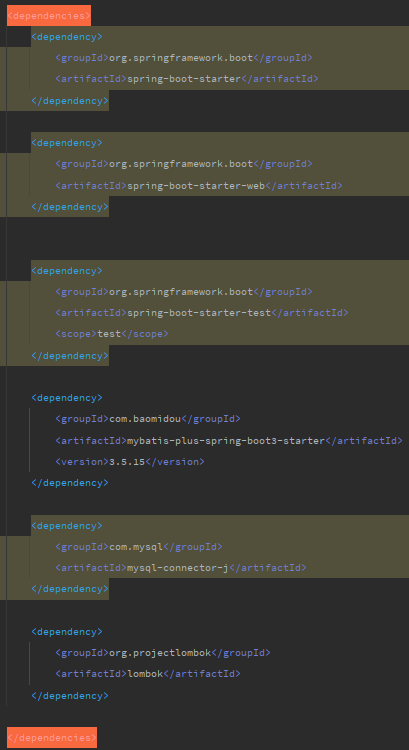
2. springboot3整合mybatisplus
2.1 依赖说明
    1. springboot3的依赖
    2. mysql的依赖
    3. mybatisplus的依赖
2.2 配置说明
server:
  port: 8081

spring:
  datasource:
    driver-class-name: com.mysql.cj.jdbc.Driver
    url: jdbc:mysql://localhost:3306/springsecurity?useSSL=false&serverTimezone=UTC
    username: root
    password: root
2.3 代码示例
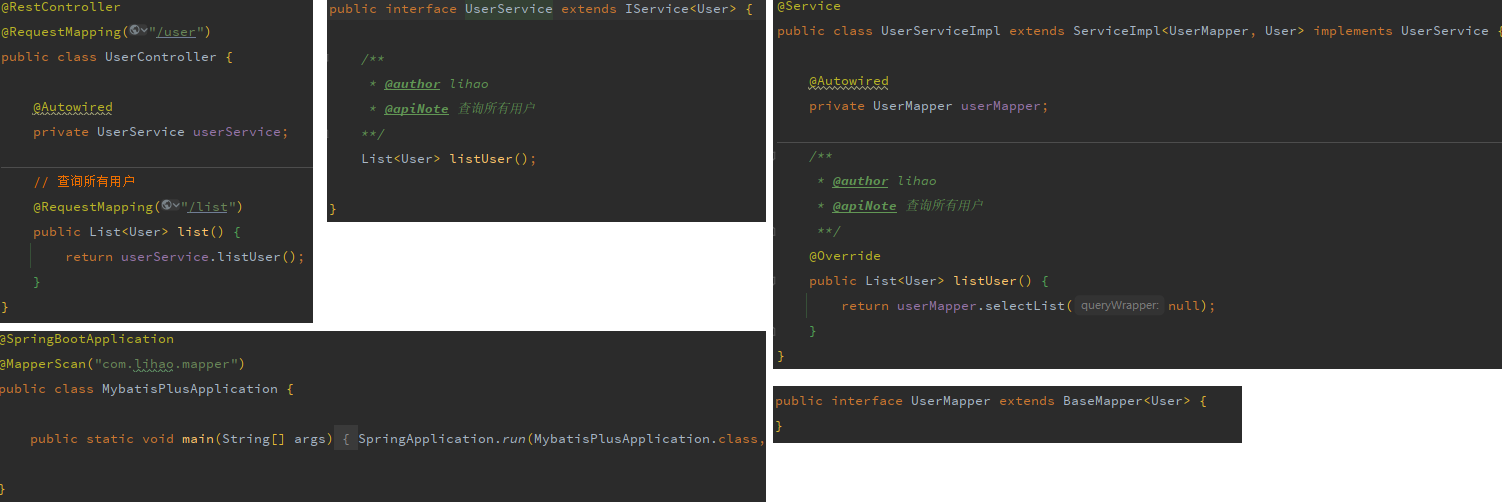
3. mybatisplus如何实现的CRUD
- 默认以类名驼峰转下划线作为表名
- 默认把变量名驼峰转下划线作为表的字段名
- 默认把名为id的字段作为主键
4. 常用注解说明
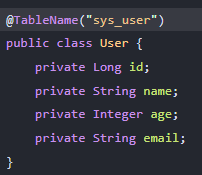
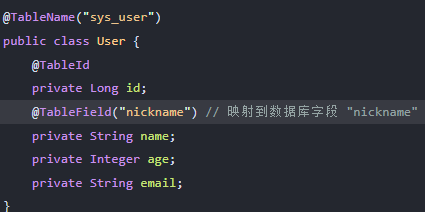
4.1 @TableName
该注解用于指定实体类对应的数据库表名。当实体类名与数据库表名不一致,或者实体类名不是数据库表名的驼峰写法时,您需要使用这个注解来明确指定表名。
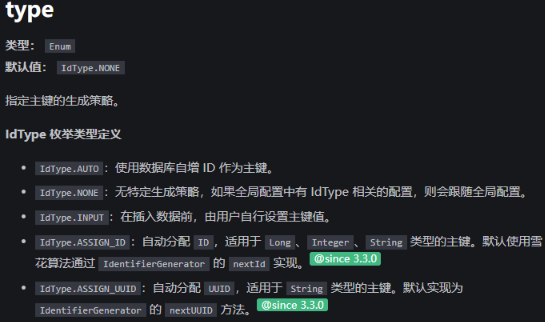
4.2 @TableId
该注解用于标记实体类中的主键字段。如果你的主键字段名为 id,你可以省略这个注解。
该注解常用属性说明:
    value:指定数据库表的主键字段名。如果不设置,MyBatis-Plus 将使用实体类中的字段名作为数据库表的主键字段名。
    type:指定主键的生成策略。
4.3 @TableField
该注解用于标记实体类中的非主键字段,它告诉 MyBatis-Plus 如何映射实体类字段到数据库表字段。如果你的实体类字段名遵循驼峰命名规则,并且与数据库表字段名一致,你可以省略这个注解。
该属性常用属性说明
    value:指定数据库中的字段名。如果你的实体类字段名与数据库字段名不同,使用这个属性来指定正确的数据库字段名。
    exist:指示这个字段是否存在于数据库表中。如果设置为 false,MyBatis-Plus 在生成 SQL 时会忽略这个字段。
4.4 @Mapper
该注解用于标注 MyBatis 的 Mapper 接口,表示该接口是一个 Mapper(映射器),MyBatis 会为接口生成实现并将其作为 Spring Bean 注册(取决于扫描/配置方式)。简单来说,它把一个普通接口标识为 MyBatis 的数据访问组件,便于在 Spring 容器中注入使用。
4.5 @MapperScan
该注解用于批量扫描指定包下的接口并把它们作为 Mapper 注册到 Spring(可以不在接口上写 @Mapper)。
5. 常用配置
5.1 configLocation
类型:string,默认值:null
指定 MyBatis 配置文件的位置。如果有单独的 MyBatis 配置文件,应将其路径配置到configLocation
mybatis-plus:
  config-location: classpath:/mybatis-config.xml
5.2 mapperLocations
类型:string[],默认值:["classpath:/mapper/**/.xml"]
指定 MyBatis Mapper 对应的 XML 文件位置。如果在 Mapper 中有自定义方法,需要配置此项。
注意:对于 Maven 多模块项目,扫描路径应以 classpath*: 开头,以加载多个 JAR 包中的 XML 文件。
mybatis-plus:
  mapper-locations: classpath:/mapper/**.xml
5.3 mapUnderscoreToCamelCase
类型:boolean,默认值:true
开启自动驼峰命名规则(camel case)映射,即从经典数据库列名 A_COLUMN(下划线命名) 到经典 Java 属性名 aColumn(驼峰命名) 的类似映射。
mybatis-plus:
  configuration:
    map-underscore-to-camel-case: true
5.4 log-impl
将mybatisplus的日志输出到控制台。
mybatis-plus:
  configuration:
    # 如果项目无日志框架,可以考虑指定为 org.apache.ibatis.logging.stdout.StdOutImpl (请勿在实际生产中使用).
    log-impl: org.apache.ibatis.logging.stdout.StdOutImpl
6. 条件查询
    // new new LambdaQueryWrapper<>方式
	@Override
	public List<User> listUser() {
		LambdaQueryWrapper<User> wrapper = new LambdaQueryWrapper<>();
		wrapper.eq(User::getAge, 18);
		return userMapper.selectList(wrapper);
	}
    // 直接lambdaQuery().的方式
	@Override
	public List<User> listUser() {
		List<User> list = lambdaQuery().eq(User::getAge, 18).list();
		return list;
	}
7. 逻辑删除的实现
mp官网有详细解释,有2中方式实现逻辑删除,一种是全局,一种是局部。
全局方式介绍:
在 application.yml 中配置 MyBatis-Plus 的全局逻辑删除属性:
mybatis-plus:
  global-config:
    db-config:
      logic-delete-field: deleted # 全局逻辑删除字段名(deleted为实体类属性名称)
      logic-delete-value: 1 # 逻辑已删除值。可选,默认值为 1
      logic-not-delete-value: 0 # 逻辑未删除值。可选,默认值为 0

8. JSON处理器
有时候,我们数据库里面某个字段准备存json,我们可以考虑直接将该字段设置成json属性。
如果存字符串的话,直接使用比较好用,但是如果要用该json里面的属性时就比较麻烦(需要解析该字符串转成对象,再从对象.取属性)。
如果数据库里面是字符串,我们返回给前端的时候,前端也还要再去处理字符串,或者我们处理该字符串返回成json给前端就比较麻烦。
通过mp的json处理器来解决这个问题。
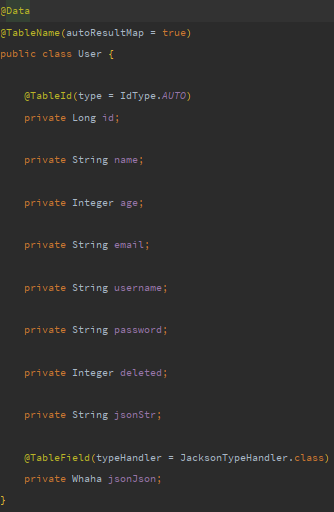
- 首先我们数据表该字段的类型用json来存
- 实体类中该字段我们用对象来定义它
- 实体类中该字段上加注解 @TableField(typeHandler = JacksonTypeHandler.class)
- 实体类中需要开启autoResultMap 。@TableName(autoResultMap = true)
- 如果你有.xml,则还需要在其中设置
typeHandler属性
<!-- 单个字段的类型处理器配置 -->
<result column="other_info" jdbcType="VARCHAR" property="otherInfo" typeHandler="com.baomidou.mybatisplus.extension.handlers.JacksonTypeHandler" />

<!-- 多个字段中某个字段的类型处理器配置 -->
<resultMap id="departmentResultMap" type="com.baomidou...DepartmentVO">
    <result property="director" column="director" typeHandler="com.baomidou.mybatisplus.extension.handlers.JacksonTypeHandler" />
</resultMap>
<select id="selectPageVO" resultMap="departmentResultMap">
   select id,name,director from department ...
</select>
9. 分页插件
在比较新的版本中mp的分页插件依赖需要额外导入,详见官网。
- 添加依赖
        <dependency>
            <groupId>com.baomidou</groupId>
            <artifactId>mybatis-plus-jsqlparser</artifactId>
            <version>3.5.12</version>
        </dependency>
- 添加配置
@Configuration
public class MybatisPlusConfig {

    /**
     * 添加分页插件
     */
    @Bean
    public MybatisPlusInterceptor mybatisPlusInterceptor() {
        MybatisPlusInterceptor interceptor = new MybatisPlusInterceptor();
        interceptor.addInnerInterceptor(new PaginationInnerInterceptor(DbType.MYSQL)); // 如果配置多个插件, 切记分页最后添加
        // 如果有多数据源可以不配具体类型, 否则都建议配上具体的 DbType
        return interceptor;
    }
}
- 使用
	@Override
	public List<User> pageList(Long page, Long size) {
		Page<User> userPage = new Page<>(page, size);
        // 定义Page对象时,我们将其打印出来
		System.out.println(userPage); // Page{records=[], total=0, size=1, current=1, orders=[], optimizeCountSql=true, searchCount=true, optimizeJoinOfCountSql=true, maxLimit=null, countId='null'}


		Page<User> result = userMapper.selectPage(userPage, null);

        // 将其传入selectPage后,我们又将其打印出来,2者变了
		// Page{records=[User(id=1, name=张三, age=18, [email protected], username=zhangsan, password=$2a$10$slXZLNlMGrAEqc5U8DQV3ey4NA47a3NHAFCUvvY6V6PMbkpjSxDWa, deleted=0, jsonStr=null, jsonJson=null)], total=3, size=1, current=1, orders=[], optimizeCountSql=true, searchCount=true, optimizeJoinOfCountSql=true, maxLimit=null, countId='null'}
		System.out.println(userPage);
		// Page{records=[User(id=1, name=张三, age=18, [email protected], username=zhangsan, password=$2a$10$slXZLNlMGrAEqc5U8DQV3ey4NA47a3NHAFCUvvY6V6PMbkpjSxDWa, deleted=0, jsonStr=null, jsonJson=null)], total=3, size=1, current=1, orders=[], optimizeCountSql=true, searchCount=true, optimizeJoinOfCountSql=true, maxLimit=null, countId='null'}
		System.out.println(result);

		// userPage 与 result都是一样的。  所以  userMapper.selectPage(userPage, null);  其实可以不需要返回,  直接拿userPage用也可以
		return result.getRecords();
	}
10. 自定义sql与分页
	@Override
	public List<User> pageListCustom(Long page, Long size, String name) {
		Page<User> userPage = new Page<>(page, size);
		userPage = userMapper.pageListCustom(userPage, name);
		return userPage.getRecords();
	}
    public interface UserMapper extends BaseMapper<User> {
    	Page<User> pageListCustom(@Param("page") Page<User> page, @Param("name") String name);
        // 或者返回 List,不过,如果这样定义接口返回值的话,返回的集合就是分页后的集合数据,得不到其他信息。
        List<UserVo> selectPageVo(IPage<UserVo> page, Integer state);
    }
    <select id="pageListCustom" resultType="com.lihao.domain.User">
        select * from user where name like concat('%', #{name}, '%')
    </select>
注意事项:
- 如果想临时不分页,可以在初始化 IPage 时 size 参数传入小于 0 的值。
- 如果 XML 需要从 page 里取值,需要使用 page.属性 获取。
- 如果返回类型是 List,则入参的 IPage 可以为 null,但需要手动设置入参的 IPage.setRecords(返回的 List)。
	@Override
	public List<User> pageListCustom(Long page, Long size, String name) {
        // 不分页
		Page<User> userPage = new Page<>(-1, -1);
		userPage = userMapper.pageListCustom(userPage, name);
		return userPage.getRecords();
	}
11. 动态sql的强制更新
由于mp默认是动态sql更新。但是有时候我们,就想将某个字段设置成null。怎么处理。 方法有多种,只介绍最常用的一种。
常见的实现“把某个字段设置为 NULL”的方式里,可以结合 LambdaUpdateWrapper 来实现按字段名的选择性更新,包含将字段设置为 NULL 的场景。
// 示例1:
int updated = userMapper.update(null,
    new LambdaUpdateWrapper<User>()
        .set(User::getEmail, null)
        .eq(User::getId, id)
);


// 示例2:
User updateUser = new User();
updateUser.setName("Alice");
updateUser.setEmail(null); // 目标字段设为 NULL

int updated = userMapper.update(updateUser,
    new LambdaUpdateWrapper<User>()
        .eq(User::getId, id)
        .set(User::getEmail, updateUser.getEmail()) // 明确将 email 设为 NULL
);
12. 自动填充
首先,你需要定义一个类来实现 MetaObjectHandler 接口,在这个类中你可以定义哪些字段需要自动填充,以及填充的逻辑。
import com.baomidou.mybatisplus.core.handlers.MetaObjectHandler;
import org.apache.ibatis.reflection.MetaObject;
import org.springframework.stereotype.Component;

import java.time.LocalDateTime;

@Component
public class MyMetaObjectHandler implements MetaObjectHandler {

    @Override
    public void insertFill(MetaObject metaObject) {
        // 插入时的填充策略
        this.strictInsertFill(metaObject, "createTime", LocalDateTime.class, LocalDateTime.now()); // 创建时间
        this.strictInsertFill(metaObject, "updateTime", LocalDateTime.class, LocalDateTime.now()); // 更新时间
    }

    @Override
    public void updateFill(MetaObject metaObject) {
        // 更新时的填充策略
        this.strictUpdateFill(metaObject, "updateTime", LocalDateTime.class, LocalDateTime.now()); // 更新时间
    }
}
然后在你的实体类中,使用 @TableField 注解的 fill 属性来指定哪些字段需要自动填充。
import com.baomidou.mybatisplus.annotation.TableField;
import com.baomidou.mybatisplus.annotation.TableId;
import com.baomidou.mybatisplus.annotation.TableName;
import java.time.LocalDateTime;

@TableName("your_table")
public class YourEntity {
    @TableId
    private Long id;

    @TableField(fill = FieldFill.INSERT) // 只对插入操作自动填充
    private LocalDateTime createTime;

    @TableField(fill = FieldFill.INSERT_UPDATE) // 对插入和更新操作自动填充
    private LocalDateTime updateTime;

    // getters and setters...
}

 浙公网安备 33010602011771号