


Antd 在 Next.js 项目中,初次渲染样式丢失
问题
因为之前 Next 和 React 接连出现安全问题,于是把博客的依赖升级了一下,没想到就搞出问题了,如下图所示:

初次渲染时样式丢失,在客户端上会短暂展示 Antd 组件无样式界面,出现样式闪烁的情况。项目是 Next 14,React 18 的 App Router 项目,依赖版本:"@ant-design/nextjs-registry": "^1.3.0","antd": "^5.14.2"。
解决思路
因为 Antd 是 CSS-in-js 的 UI 库,按照官方文档呢,我们需要一个 @ant-design/nextjs-registry 包裹整个页面,在 SSR 时收集所有组件的样式,并且通过 <script> 标签在客户端首次渲染时带上。
// src/app/layout.tsx

import { AntdRegistry } from '@ant-design/nextjs-registry'

export default async function RootLayout({
  children
}: Readonly<{
  children: React.ReactNode
}>) {
  return (
    <html lang="en">
      <head>
        {/* ... */}
      </head>
      <body>
        <AntdRegistry>
          {/* ... 假装这是页面代码 */}
        </AntdRegistry>
      </body>
    </html>
  )
}
对照了一下官方文档也问了下 AI,没发现我的写法有什么问题。就在这个时候,我猛然间看见了 Antd 的 Pages Router 使用的注意事项:
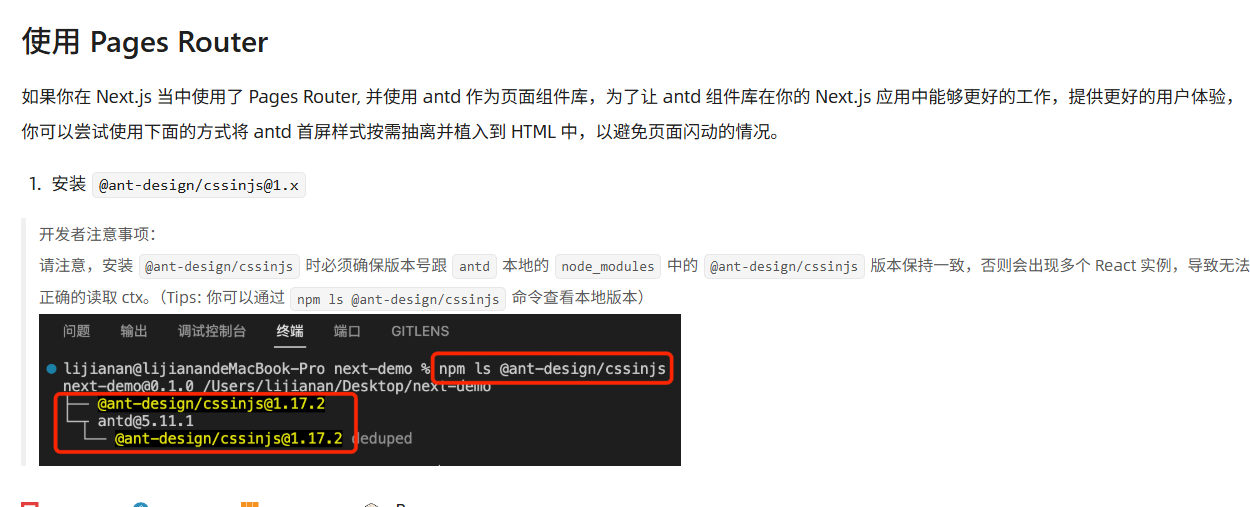
我寻思,可能我遇到的情况和这里一样,是内部依赖版本 @ant-design/cssinj 不对引起的。
输入 npm ls @ant-design/cssinjs 看了一下,
├─┬ @ant-design/[email protected]
│ └── @ant-design/[email protected]
└─┬ [email protected]
  └── @ant-design/[email protected] deduped
@ant-design/nextjs-registry 内部也使用了 @ant-design/cssinjs,而且它的版本和 antd 内置版本还不一样,这就是问题的所在了。
接下来把 @ant-design/nextjs-registry 的版本降到了 1.2.0,这时候版本对上了,bug 也就修复了。
├─┬ @ant-design/[email protected]
│ └── @ant-design/[email protected]
└─┬ [email protected]
  └── @ant-design/[email protected] deduped
@ant-design/nextjs-registry 的内部发生了什么
AntdRegistry
这勾起了我的好奇心,就让我们来看看 @ant-design/nextjs-registry 干了些什么:
https://github.com/ant-design/nextjs-registry
// /src/AntdRegistry.tsx
'use client';

import type { StyleProviderProps } from '@ant-design/cssinjs';
import type { FC } from 'react';
import { createCache, extractStyle, StyleProvider } from '@ant-design/cssinjs';
import { useServerInsertedHTML } from 'next/navigation';
import React, { useState } from 'react';

type AntdRegistryProps = Omit<StyleProviderProps, 'cache'>;

const AntdRegistry: FC<AntdRegistryProps> = (props) => {
  const [cache] = useState(() => createCache());

  useServerInsertedHTML(() => {
    const styleText = extractStyle(cache, { plain: true, once: true });

    if (styleText.includes('.data-ant-cssinjs-cache-path{content:"";}')) {
      return null;
    }

    return (
      <style
        id="antd-cssinjs"
        // to make sure this style is inserted before Ant Design's style generated by client
        data-rc-order="prepend"
        data-rc-priority="-1000"
        dangerouslySetInnerHTML={{ __html: styleText }}
      />
    );
  });

  return <StyleProvider {...props} cache={cache} />;
};

export default AntdRegistry;
除了用 Next 的 API useServerInsertedHTML 把样式字符串插到页面上之外,和 Pages Router 中 Antd 收集首屏样式的写法几乎是一样的。
@ant-design/cssinjs
首先来看上文 const [cache] = useState(() => createCache()) 这一行。
@ant-design/cssinjs 部分仓库在 https://github.com/ant-design/cssinjs
它干了几件事:
- 生成唯一实例 ID。
- (仅客户端)将 body 中的样式移到 head 中,并且去重。
export function createCache() {
  const cssinjsInstanceId = Math.random().toString(12).slice(2);

  // Tricky SSR: Move all inline style to the head.
  // PS: We do not recommend tricky mode.
  if (typeof document !== 'undefined' && document.head && document.body) {
    const styles = document.body.querySelectorAll(`style[${ATTR_MARK}]`) || [];
    const { firstChild } = document.head;

    Array.from(styles).forEach((style) => {
      (style as any)[CSS_IN_JS_INSTANCE] =
        (style as any)[CSS_IN_JS_INSTANCE] || cssinjsInstanceId;

      // Not force move if no head
      if ((style as any)[CSS_IN_JS_INSTANCE] === cssinjsInstanceId) {
        document.head.insertBefore(style, firstChild);
      }
    });

    // Deduplicate of moved styles
    const styleHash: Record<string, boolean> = {};
    Array.from(document.querySelectorAll(`style[${ATTR_MARK}]`)).forEach(
      (style) => {
        const hash = style.getAttribute(ATTR_MARK)!;
        if (styleHash[hash]) {
          if ((style as any)[CSS_IN_JS_INSTANCE] === cssinjsInstanceId) {
            style.parentNode?.removeChild(style);
          }
        } else {
          styleHash[hash] = true;
        }
      },
    );
  }

  return new CacheEntity(cssinjsInstanceId);
}
- 返回一个类包裹的
Map结构,在StyleProvider中由后代组件把首屏所需样式传回。结构如下所示:
export type KeyType = string | number;
type ValueType = [number, any];
/** Connect key with `SPLIT` */
export declare function pathKey(keys: KeyType[]): string;
declare class Entity {
    instanceId: string;
    constructor(instanceId: string);
    /** @private Internal cache map. Do not access this directly */
    cache: Map<string, ValueType>;
    extracted: Set<string>;
    get(keys: KeyType[]): ValueType | null;
    /** A fast get cache with `get` concat. */
    opGet(keyPathStr: string): ValueType | null;
    update(keys: KeyType[], valueFn: (origin: ValueType | null) => ValueType | null): void;
    /** A fast get cache with `get` concat. */
    opUpdate(keyPathStr: string, valueFn: (origin: ValueType | null) => ValueType | null): void;
}
export default Entity;
至于 StyleProvider,除了整合上层 StyleProvider 注入的样式外,它基本上是一个普通的 Context.Provider,作用也很好猜,把 createCache 返回的 Map 结构注入到下层组件中。
const StyleContext = React.createContext<StyleContextProps>({
  hashPriority: 'low',
  cache: createCache(),
  defaultCache: true,
  autoPrefix: false,
})

export const StyleProvider: React.FC<StyleProviderProps> = (props) => {
  // ...
  return (
    <StyleContext.Provider value={context}>{children}</StyleContext.Provider>
  );
};
Antd 组件的调用路径
具体源码就不细看了,以按钮组件 Button 为例,调用路径大致如下:
在 useGlobalCache 中 调用 React.useContext(StyleContext) 的 cache.onUpdate方法更新缓存。
总结
这次碰到的问题其实挺典型的:升级了依赖,结果页面出问题了。解决方法很简单——把 @ant-design/nextjs-registry 从 1.3.0 降级到 1.2.0,让它跟 antd 用的 @ant-design/cssinjs 内部版本对上就行了。
以后要是用 Next.js App Router 配 Ant Design 遇到类似情况,可以先看看这两个包的版本是不是兼容。有时候问题没看起来那么复杂,可能就是版本没对上。
出于好奇,我还顺便看了一下 AntdRegistry 内部的实现——发现它主要是通过 StyleProvider 在服务端收集样式,然后通过 useServerInsertedHTML 在客户端首次渲染时注入到 style 标签中,这样就能避免样式闪烁的问题。
大家的阅读是我发帖的动力,本文首发于我的博客:deer.shika-blog.xyz,欢迎大家来玩
喵, 转载请注明出处。

 浙公网安备 33010602011771号