


【转载】Qt中QStyledItemDelegate的使用(一)
Qt中的代理是用于常见的QTreeView、QListView和QTableView中的一个小工具,它控制视图中每一项的显示方式。当然Qt还提供了QColumnView可供使用,但是我对它不太熟不知道该视图能不能编辑。为了方便开发者自定义项目的显示方式,减少自定义项目带来的需修改的代码量,Qt提供了代理的功能。其中一个名为QStyledItemDelegate的代理可以自定义项目处于编辑状态时的显示方式。比如双击某一项目时用自己的编辑框代替系统默认的编辑框。
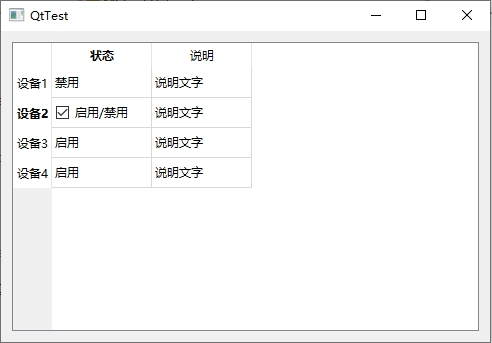
QStyledItemDelegate是Qt推荐使用的代理,和它相似的还有QItemDelegate可以用。如果你想修改整个视图的显示方式,请采用自定义视图的方式而不是自定义代理。下面我将给出一个关于QStyledItemDelegate的简单例子给初学者参考。下面的代码测试环境是VS2017和Qt5.9。代码运行效果如下。从图中可看出,复选框代替了编辑状态下系统默认的编辑框:
头文件:
 1 namespace Qt
 2 {
 3     enum CheckDataRole
 4     {
 5         ResultRole = Qt::UserRole, /* 自定义的Role,用来放布尔类型的编辑结果 */
 6     };
 7 }
 8
 9 class MCheckDelegate : public QStyledItemDelegate
10 {
11     Q_OBJECT
12
13 public:
14     explicit MCheckDelegate(QObject *parent = 0);
15     QWidget *createEditor(QWidget *parent, const QStyleOptionViewItem &option, const QModelIndex &index) const override;
16     void setEditorData(QWidget *editor, const QModelIndex &index) const override;
17     void setModelData(QWidget *editor, QAbstractItemModel *model, const QModelIndex &index) const override;
18     void updateEditorGeometry(QWidget *editor, const QStyleOptionViewItem &option, const QModelIndex &index) const override;
19 };
CPP文件:
 1 MCheckDelegate::MCheckDelegate(QObject *parent) :
 2     QStyledItemDelegate(parent)
 3 {
 4 }
 5
 6 QWidget *MCheckDelegate::createEditor(QWidget *parent, const QStyleOptionViewItem &option, const QModelIndex &index) const
 7 {
 8     const QString style = u8R"(QCheckBox {
 9         padding-left: 4px;
10         background-color: white;
11         })";
12     QCheckBox* cbBox = new QCheckBox(u8"启用/禁用", parent);
13     cbBox->setStyleSheet(style);
14     return cbBox;
15 }
16
17 void MCheckDelegate::setEditorData(QWidget *editor, const QModelIndex &index) const
18 {
19     QCheckBox* cbWidget = dynamic_cast<QCheckBox*>(editor);
20     cbWidget->setChecked(index.data(Qt::DisplayRole).toString() == u8"启用");
21 }
22
23 void MCheckDelegate::setModelData(QWidget *editor, QAbstractItemModel *model, const QModelIndex &index) const
24 {
25     bool state = dynamic_cast<QCheckBox*>(editor)->isChecked();
26     model->blockSignals(true);
27     model->setData(index, state ? u8"启用" : u8"禁用", Qt::DisplayRole);
28     model->blockSignals(false);
29     model->setData(index, state, Qt::ResultRole);
30 }
31
32 void MCheckDelegate::updateEditorGeometry(QWidget *editor, const QStyleOptionViewItem &option, const QModelIndex &index) const
33 {
34     editor->setGeometry(option.rect);
35 }
主窗口构造函数代码如下。本例中QtTest是主窗口类,ui.tvHost是QTableView控件:
 1 QtTest::QtTest(QWidget *parent)
 2     : QMainWindow(parent)
 3 {
 4     ui.setupUi(this);
 5
 6     ui.tvHost->setItemDelegateForColumn(0, new MCheckDelegate(ui.tvHost));
 7     QStandardItemModel* model = new QStandardItemModel(ui.tvHost);
 8     model->setHorizontalHeaderLabels({ u8"状态", u8"说明" });
 9     model->setVerticalHeaderLabels({ u8"设备1", u8"设备2", u8"设备3", u8"设备4" });
10     model->setColumnCount(2);
11     model->setRowCount(4);
12     for (int i = 0; i < 4; i++)
13     {
14         model->setItem(i, 0, new QStandardItem(u8"启用"));
15         model->setItem(i, 1, new QStandardItem(u8"说明文字"));
16     }
17     ui.tvHost->setModel(model);
18 }
转载自:https://chuna2.787528.xyz/mengxiangdu/p/17815515.html

 浙公网安备 33010602011771号