


102302106-陈昭颖-第三次作业
作业1
实验一,爬取网站内所有图片
要求:
指定一个网站,爬取这个网站中的所有的所有图片,例如中国气象网(http://www.weather.com.cn)。实现单线程和多线程的方式爬取。
思路
打开中国气象网的f12界面,爬取查看跟照片有关的信息(如图中红圈部分)
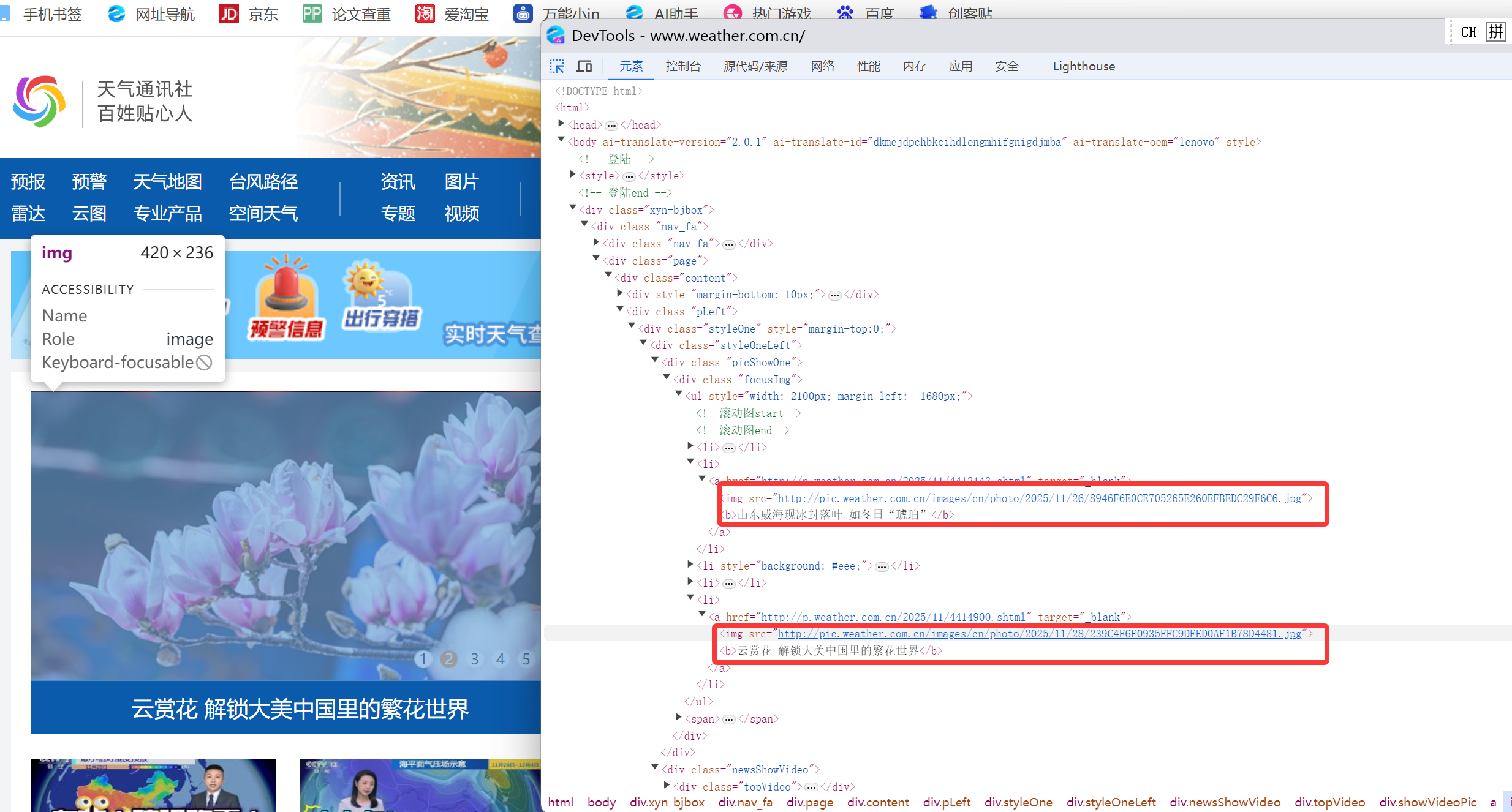
发现图片的信息都是img和src
核心代码爬取图片url和下载图片的函数
def get_image_url(url, result_queue):
    img_urls = []
      response = requests.get(url)
      soup = BeautifulSoup(response.text, 'html.parser')

      for img in soup.find_all('img'):
          img_url = img.get('src')
          if img_url and (img_url.endswith('.jpg') or img_url.endswith('.jpeg') or img_url.endswith('.png')):
              img_urls.append(img_url)

      result_queue.put(img_urls)
  except Exception as e:
      result_queue.put([])


def download_image(target_dir, image_url, index):
    filename = image_url.split('/')[-1].split('?')[0]
    filename = f"{index}-{filename}"
    path = os.path.join(target_dir, filename)

    with open(path, 'wb') as f:
        f.write(requests.get(image_url).content)
多线程:
tasks = []
T = threading.Thread(target=get_image_url, args=(url, result_queue))
T.start()
tasks.append(T)

for idx, task in enumerate(tasks):
    task.join()

# 从队列中获取结果
img_urls = result_queue.get()
for url in img_urls:
    print(url)

for index, url in enumerate(img_urls):
    download_image(target_dir, url, index)
运行结果

完整代码
https://gitee.com/C-Zhaoying/2025_crawl_project/tree/master/hw3p/1
心得体会
本次实验我抓取了天气网这个页面的所有图片,其中多线程的爬取有一些问题,因为arg的元素是一个元组而我当时只是丢了一个url,结果一直报错,后面我把爬取的url存储到一个队列里面,这样就可以成功运行了
作业2
实验二,爬取股票相关信息
要求:
熟练掌握 scrapy 中 Item、Pipeline 数据的序列化输出方法;使用scrapy框架+Xpath+MySQL数据库存储技术路线爬取股票相关信息。
思路
查看股票https://quote.eastmoney.com/center/gridlist.html#hs_a_board网址的f12可以发现需要获取的内容在网页上可以用xpath获取(后面那三个分别为最新报价,涨跌幅,涨跌额),其他数据也同理可以获取

核心代码(eastmoney.py)
class StockSpider(scrapy.Spider):
    name = 'eastmoney'
    allowed_domains = ['quote.eastmoney.com']
    start_urls = ['https://quote.eastmoney.com/center/gridlist.html#hs_a_board']

    def parse(self, response):
        stocks = response.xpath("//div[@id='mainc']//table/tbody/tr")

        for stock in stocks:
            item = StockSpiderItem()
            item['id'] = stock.xpath('./td[1]/text()').get()
            item['stock_code'] = stock.xpath('./td[2]/a/text()').get()
            item['name'] = stock.xpath('./td[3]/a/text()').get()
            item['latest_price'] = stock.xpath('./td[5]/span/text()').get()
            item['change_percent'] = stock.xpath('./td[6]/span/text()').get()
            item['change_amount'] = stock.xpath('./td[7]/span/text()').get()
            item['volume'] = stock.xpath('./td[8]/text()').get()
            item['turnover'] = stock.xpath('./td[9]/text()').get()
            item['amplitude'] = stock.xpath('./td[10]/text()').get()
            item['high'] = stock.xpath('./td[11]/span/text()').get()
            item['low'] = stock.xpath('./td[12]/span/text()').get()
            item['open_price'] = stock.xpath('./td[13]/span/text()').get()
            item['close_price'] = stock.xpath('./td[14]/span/text()').get()

            yield item
核心代码(items.py)
import scrapy

class StockSpiderItem(scrapy.Item):
    # 定义表头字段(英文命名)
    id = scrapy.Field()           # 序号
    stock_code = scrapy.Field()   # 股票代码
    name = scrapy.Field()         # 名称
    latest_price = scrapy.Field() # 最新报价
    change_percent = scrapy.Field() # 涨跌幅
    change_amount = scrapy.Field() # 涨跌额
    volume = scrapy.Field()       # 成交量
    turnover = scrapy.Field()     # 成交额
    amplitude = scrapy.Field()    # 振幅
    high = scrapy.Field()         # 最高
    low = scrapy.Field()          # 最低
    open_price = scrapy.Field()   # 今开
    close_price = scrapy.Field()  # 昨收
核心代码(pipeline.py)
class MySQLPipeline:
    def __init__(self, mysql_host, mysql_db, mysql_user, mysql_password):
        self.mysql_host = mysql_host
        self.mysql_db = mysql_db
        self.mysql_user = mysql_user
        self.mysql_password = mysql_password

    @classmethod
    def from_crawler(cls, crawler):
        return cls(
            mysql_host=crawler.settings.get('MYSQL_HOST'),
            mysql_db=crawler.settings.get('MYSQL_DATABASE'),
            mysql_user=crawler.settings.get('MYSQL_USER'),
            mysql_password=crawler.settings.get('MYSQL_PASSWORD')
        )

    def open_spider(self, spider):
        self.conn = pymysql.connect(
            host=self.mysql_host,
            user=self.mysql_user,
            password=self.mysql_password,
            db=self.mysql_db,
            charset='utf8mb4'
        )
        self.cursor = self.conn.cursor()

        # 创建表
        self.create_table()

    def create_table(self):
        create_table_sql = """
        CREATE TABLE IF NOT EXISTS stocks (
            id INT PRIMARY KEY,
            stock_code VARCHAR(20),
            name VARCHAR(100),
            latest_price DECIMAL(10,2),
            change_percent VARCHAR(20),
            change_amount DECIMAL(10,2),
            volume VARCHAR(20),
            turnover VARCHAR(20),
            amplitude VARCHAR(20),
            high DECIMAL(10,2),
            low DECIMAL(10,2),
            open_price DECIMAL(10,2),
            close_price DECIMAL(10,2),
            created_time TIMESTAMP DEFAULT CURRENT_TIMESTAMP
        )
        """
        self.cursor.execute(create_table_sql)
        self.conn.commit()

    def close_spider(self, spider):
        self.conn.close()

    def process_item(self, item, spider):
        insert_sql = """
        INSERT INTO stocks
        (id, stock_code, name, latest_price, change_percent, change_amount,
         volume, turnover, amplitude, high, low, open_price, close_price)
        VALUES (%s, %s, %s, %s, %s, %s, %s, %s, %s, %s, %s, %s, %s)
        """

        self.cursor.execute(insert_sql, (
            item['id'],
            item['stock_code'],
            item['name'],
            item['latest_price'],
            item['change_percent'],
            item['change_amount'],
            item['volume'],
            item['turnover'],
            item['amplitude'],
            item['high'],
            item['low'],
            item['open_price'],
            item['close_price']
        ))
        self.conn.commit()
        return item
项目结构
stock_spider/
├── stock_spider/
│ ├── spiders/
│ │ ├── init.py
│ │ └── eastmoney.py
│ ├── init.py
│ ├── items.py
│ ├── middlewares.py
│ ├── pipelines.py
│ └── settings.py
└── scrapy.cfg
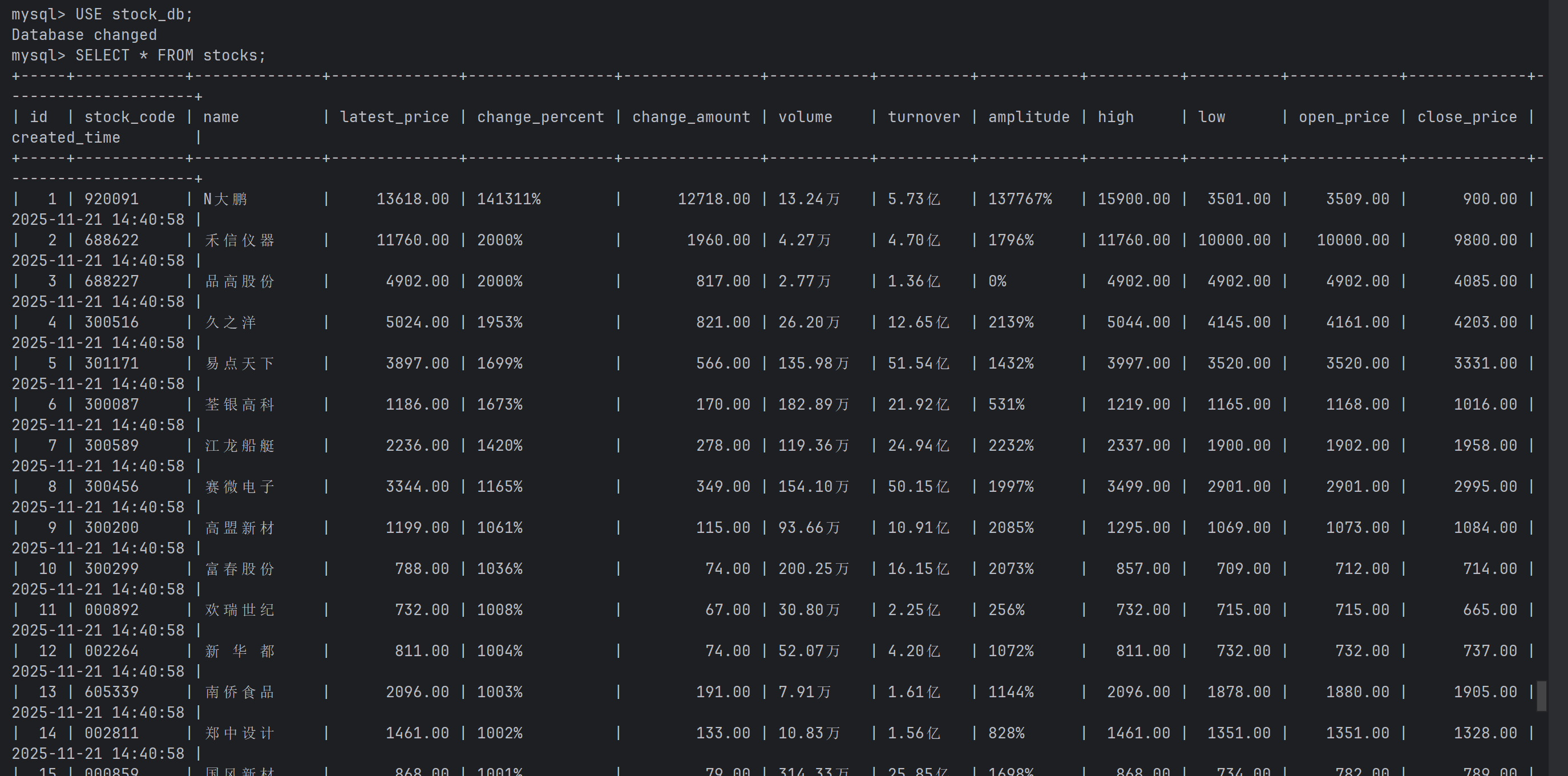
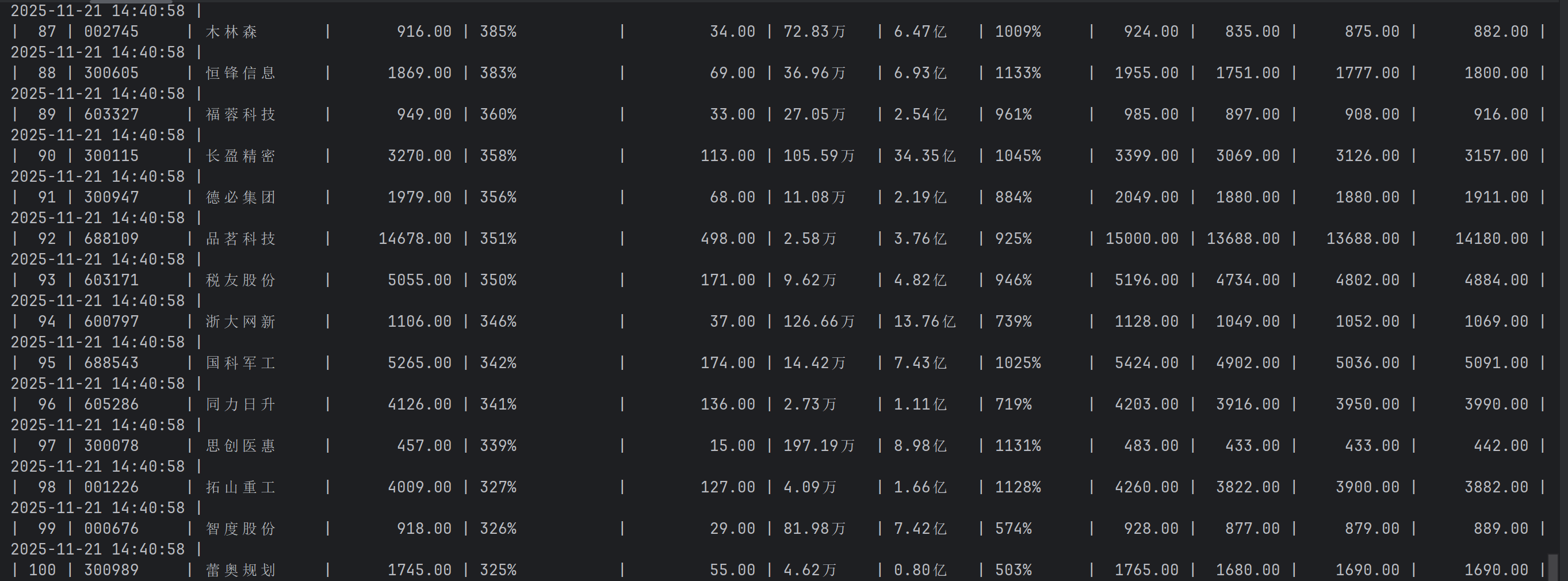
运行结果
完整代码
https://gitee.com/C-Zhaoying/2025_crawl_project/tree/master/hw3p/2/stock_spider
心得体会
本次实验我第一次在pycharm配置mysql,发现一直找不到密码在哪,后面借助了phpstudy来构造mysql,终于成功了,同时也更加熟悉 scrapy 中 Item、Pipeline 数据的序列化输出方法
作业3
实验三,爬取外汇网站数据
要求
熟练掌握 scrapy 中 Item、Pipeline 数据的序列化输出方法;使用scrapy框架+Xpath+MySQL数据库存储技术路线爬取外汇网站数据。
思路
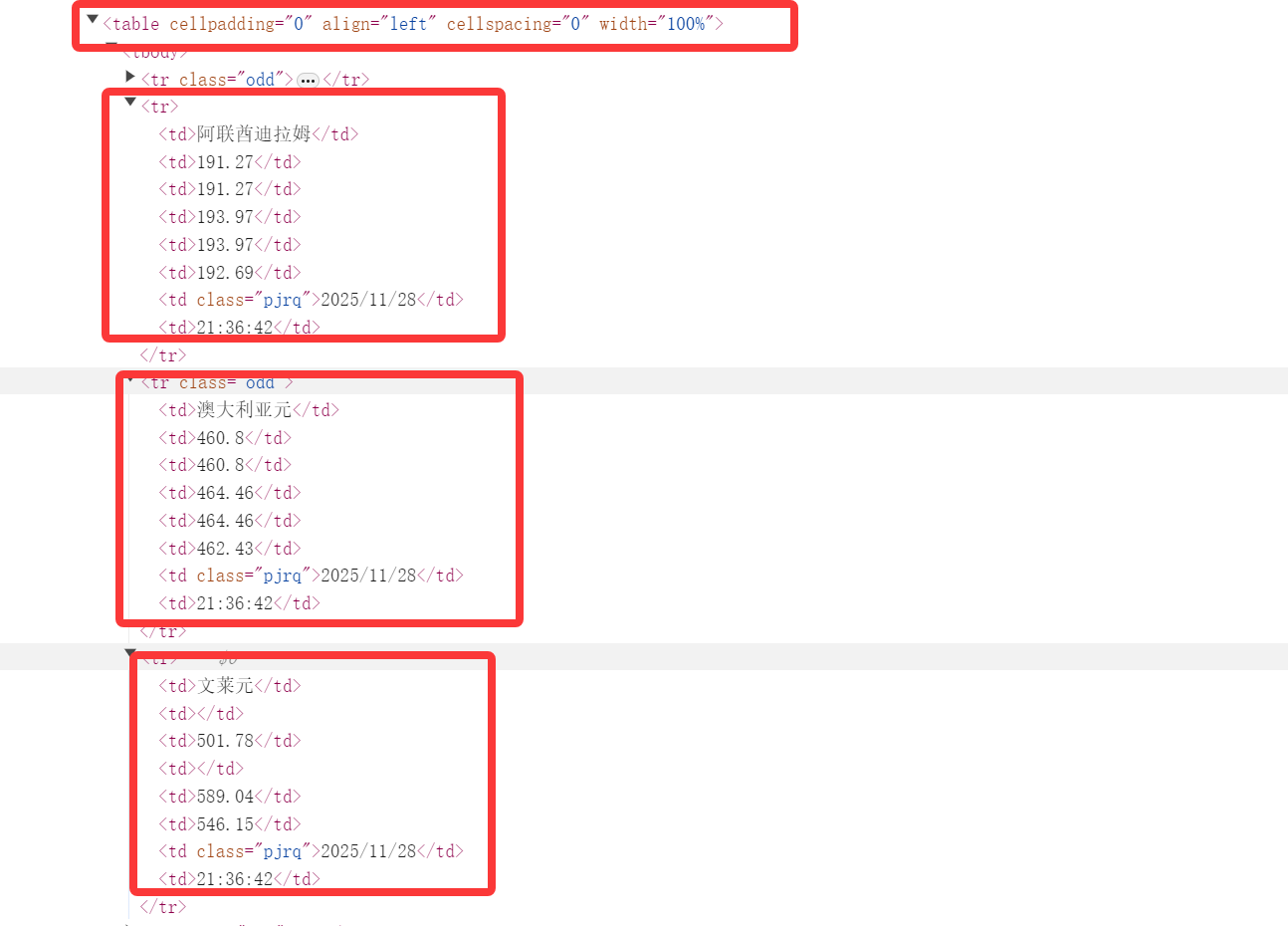
首先打开网页发现外汇网站的数据也类似表格类型,再取查看f12

可以提取每一行,再用xpath对每一行的元素进行精确提取
核心代码
import scrapy
from boc_whpj.items import BocWphpjItem

class WhpjSpiderSpider(scrapy.Spider):
    name = 'whpj_spider'
    allowed_domains = ['boc.cn']
    start_urls = ['https://www.boc.cn/sourcedb/whpj/']

    def parse(self, response):
        rows = response.xpath('//table[@cellpadding="0" and @cellspacing="0"]/tbody/tr[position()>1]')

        for row in rows:
            cells = row.xpath('./td')

            if len(cells) >= 8:
                item = BocWphpjItem()

                item['Currency'] = cells[0].xpath('string(.)').get().strip()
                item['TBP'] = cells[1].xpath('string(.)').get().strip()
                item['CBP'] = cells[2].xpath('string(.)').get().strip()
                item['TSP'] = cells[3].xpath('string(.)').get().strip()
                item['CSP'] = cells[4].xpath('string(.)').get().strip()
                item['Time'] = cells[7].xpath('string(.)').get().strip()

                if item['Currency']:
                    yield item
项目结构
boc_whpj/
├── scrapy.cfg
└── boc_whpj/
├── init.py
├── items.py
├── middlewares.py
├── pipelines.py
├── run_spider.py
├── settings.py
└── spiders/
├── init.py
└── whpj_spider.py
运行结果

完整代码
https://gitee.com/C-Zhaoying/2025_crawl_project/tree/master/hw3p/3/boc_whpj
心得体会
本次实验爬取的是外汇的相关信息,通过实验二,这次的实验更加得心应手,不过有时候配置还是会有遗漏,还有很多需要学习

 浙公网安备 33010602011771号